
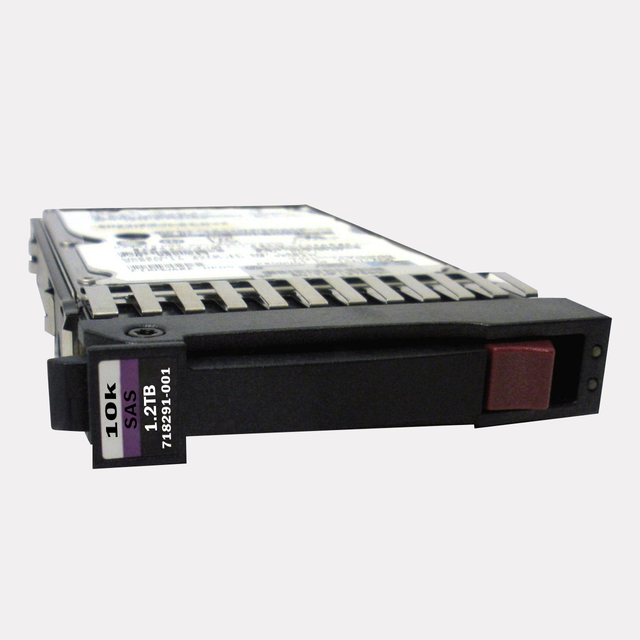
The Unsung Hero of Your Data Center: Why the HPE AT146A 1.2TB Enterprise Hard Drive is the Reliable Workhorse Your Legacy Servers Can't Live Without
The Complete Guide to HPE AT146A 1.2TB Enterprise Hard Drive: Power Your Mission-Critical Servers
Introduction
In the ever-evolving landscape of enterprise data storage, reliability and performance aren't just features—they're necessities. The HPE AT146A 1.2TB 10000RPM 2.5-inch Small Form Factor Dual Port SAS-6Gbps Enterprise Hard Drive represents a cornerstone solution for businesses running critical applications on HPE Integrity and ProLiant servers. Whether you're managing a data center, maintaining legacy systems, or ensuring business continuity, understanding this enterprise-grade storage solution can make all the difference in your infrastructure planning.
Let's dive deep into what makes this hard drive an essential component for enterprise environments and why it continues to be relevant in today's storage ecosystem.
What is the HPE AT146A Enterprise Hard Drive?
The HPE AT146A is a high-performance enterprise hard drive specifically engineered for demanding server environments. This isn't your typical desktop storage—it's a ruggedized, precision-crafted component designed to deliver consistent performance under the most challenging conditions.
Key Specifications at a Glance
- Capacity: 1.2TB (1,200GB)
- Rotational Speed: 10,000 RPM
- Form Factor: 2.5-inch Small Form Factor (SFF)
- Interface: Dual Port SAS-6Gbps (Serial Attached SCSI)
- Compatibility: HPE Integrity Servers and ProLiant Gen1 to Gen7 Servers
- Use Case: Enterprise-level applications, databases, and mission-critical workloads
Understanding the Product Designation
The "AT146A" designation is HPE's specific part number for this configuration. Understanding this nomenclature helps IT professionals quickly identify the exact drive specifications when ordering replacements or planning upgrades—a crucial detail when managing large server fleets.
Technical Excellence: Breaking Down the Specifications
Storage Capacity: The 1.2TB Sweet Spot
The 1.2TB capacity represents a carefully balanced choice for enterprise environments. While larger capacity drives exist, this size offers several strategic advantages:
Optimal Performance-to-Capacity Ratio: The 1.2TB capacity allows the drive to maintain exceptional access times without the performance penalties sometimes associated with higher-density storage.
RAID Configuration Flexibility: This capacity works exceptionally well in various RAID configurations (RAID 0, 1, 5, 6, 10), providing administrators with flexibility in balancing performance, redundancy, and usable storage.
Cost-Effectiveness: For mission-critical applications where performance trumps raw capacity, the 1.2TB offering provides an economical solution without compromising on enterprise-grade reliability.
Blazing Fast: 10,000 RPM Performance
The 10K RPM spindle speed is where this drive truly shines in enterprise environments.
Superior Input/Output Operations: The faster rotational speed translates directly into higher IOPS (Input/Output Operations Per Second), making this drive ideal for transactional databases, email servers, and applications requiring rapid data access.
Reduced Latency: Every millisecond counts in enterprise computing. The 10,000 RPM speed significantly reduces rotational latency compared to standard 7,200 RPM drives, ensuring your applications respond faster to user requests.
Enhanced Random Access Performance: Unlike sequential read/write operations, random access—common in database queries—benefits tremendously from higher rotational speeds, making this drive perfect for SQL databases, Oracle environments, and similar workloads.
Connectivity and Interface: Dual Port SAS-6Gbps Explained
Why SAS Matters in Enterprise Environments
Serial Attached SCSI (SAS) technology represents the gold standard for enterprise storage connectivity, and for good reason.
Enterprise-Grade Reliability: SAS drives are built with more robust components and undergo stricter quality control than consumer-grade SATA drives, resulting in significantly lower failure rates and longer mean time between failures (MTBF).
Advanced Error Correction: SAS technology incorporates sophisticated error detection and correction mechanisms, ensuring data integrity even in demanding 24/7 operational environments.
Hot-Swap Capability: Critical for maintaining uptime, SAS drives can be replaced while the system remains operational—a feature that's absolutely essential in production environments.
The Dual Port Advantage
The dual-port configuration sets this drive apart from single-port alternatives.
Redundant Data Paths: With two independent connections to the server, if one path fails, the second automatically takes over, ensuring continuous operation without data loss or downtime.
Enhanced Performance: In certain configurations, both ports can be utilized simultaneously, potentially improving throughput and reducing bottlenecks in high-demand scenarios.
Increased Reliability: Dual-port architecture is particularly valuable in high-availability clusters and failover configurations where redundancy is paramount.
SAS-6Gbps: The Speed Connection
The 6Gbps interface provides ample bandwidth for the drive's performance capabilities:
- Sufficient Headroom: The 6Gbps throughput ensures the interface never becomes a bottleneck, allowing the drive's mechanical performance to shine.
- Backward Compatibility: SAS-6Gbps drives typically work with 3Gbps controllers, providing upgrade flexibility.
- Future-Ready: While newer 12Gbps interfaces exist, 6Gbps remains perfectly adequate for 10K RPM mechanical drives.
Small Form Factor: Big Advantages in a Compact Package
The 2.5-Inch Advantage
The small form factor design delivers numerous benefits for modern data centers:
Higher Density Deployment: More drives fit in the same rack space compared to traditional 3.5-inch drives, allowing for greater storage density and more efficient use of valuable data center real estate.
Improved Energy Efficiency: Smaller platters require less power to spin, reducing both operational costs and cooling requirements—critical considerations in large-scale deployments.
Enhanced Reliability: The smaller physical size means shorter head travel distances, potentially improving both performance and reliability while reducing mechanical stress on components.
Better Cooling Characteristics: Smaller drives generate less heat and allow for better airflow within server chassis, contributing to overall system stability.
Server Compatibility: Integrity and ProLiant Gen1 to Gen7
HPE Integrity Server Compatibility
The HPE Integrity line represents mission-critical computing platforms designed for maximum uptime and reliability.
Mission-Critical Workloads: Integrity servers typically run demanding applications such as SAP, Oracle databases, and enterprise resource planning (ERP) systems—precisely the environments where the AT146A excels.
High Availability Requirements: These servers often operate in clustered configurations where the dual-port architecture and enterprise-grade reliability of the AT146A are essential.
Industry-Specific Applications: Financial services, healthcare, telecommunications, and government sectors commonly deploy Integrity servers, all of which benefit from the proven reliability of this drive.
ProLiant Gen1 to Gen7 Server Support
The broad compatibility across ProLiant generations makes this drive especially valuable for organizations with mixed infrastructure.
Legacy System Support: For organizations maintaining older ProLiant servers, the AT146A provides a reliable replacement option, extending the operational life of existing infrastructure.
Standardization Opportunities: IT departments can standardize on a single drive model across multiple server generations, simplifying inventory management and reducing complexity.
Migration Flexibility: When planning infrastructure upgrades, having drives compatible across generations provides valuable flexibility in timing and budgeting.
Generation-Specific Considerations
Gen1-Gen4 Servers: These earlier generations particularly benefit from the proven reliability of this drive model, often serving as replacement drives for aging infrastructure.
Gen5-Gen7 Servers: While these later generations support more modern storage options, the AT146A remains an excellent choice for applications prioritizing proven performance over cutting-edge capacity.
Performance Characteristics and Use Cases
Ideal Workload Scenarios
Understanding where this drive performs best helps maximize your investment:
Database Servers: The high IOPS and low latency make this drive perfect for SQL Server, Oracle, MySQL, and other database platforms where quick data access is critical.
Email Servers: Microsoft Exchange and similar email platforms benefit tremendously from the rapid random access performance this drive delivers.
Transactional Applications: Point-of-sale systems, financial trading platforms, and other transaction-heavy applications thrive on the consistent performance characteristics.
Virtual Machine Storage: When used in RAID configurations, these drives provide excellent performance for VMware, Hyper-V, and other virtualization platforms.
Web Servers and Application Servers: Applications requiring quick access to numerous small files benefit from the high rotational speed and low latency.
Performance Metrics That Matter
IOPS Performance: While exact figures vary by workload, 10K RPM SAS drives typically deliver significantly higher IOPS than 7.2K RPM alternatives—often 2-3x improvement in random read/write scenarios.
Average Seek Time: The combination of 10K RPM speed and 2.5-inch form factor results in excellent seek times, typically in the 3-4 millisecond range.
Sustained Transfer Rates: Expect sustained throughput in the 140-160 MB/s range, adequate for most enterprise applications when properly configured in RAID arrays.
Reliability and Enterprise-Grade Features
Built for 24/7 Operation
Unlike consumer drives designed for 8-hour daily usage, the AT146A is engineered for continuous operation:
Extended MTBF: Enterprise SAS drives typically offer MTBF ratings of 1.4-1.6 million hours, significantly exceeding consumer-grade alternatives.
Enhanced Component Quality: From bearings to read/write heads, every component undergoes rigorous quality control and is built to withstand continuous operation.
Thermal Management: Advanced heat dissipation design ensures stable operation even in densely packed server environments where temperatures can be challenging.
Data Integrity Features
Error Rate Specifications: Enterprise drives maintain much lower unrecoverable error rates compared to consumer drives—typically 1 sector per 10^16 bits read, ensuring exceptional data integrity.
Vibration Resistance: Rotational vibration safeguards help maintain performance even when multiple drives operate in close proximity—a common scenario in enterprise servers.
Power Loss Protection: Advanced electronics help protect data in the event of unexpected power interruptions, minimizing the risk of corruption.
Installation and Configuration Best Practices
Pre-Installation Considerations
Firmware Verification: Before installation, verify that your server's firmware and RAID controller are up to date to ensure full compatibility and optimal performance.
RAID Planning: Determine the appropriate RAID level based on your performance and redundancy requirements before deploying drives.
Capacity Planning: Consider both current needs and future growth when determining how many drives to deploy.
Physical Installation Steps
Hot-Swap Procedure: If replacing a failed drive in a RAID array, follow proper hot-swap procedures to maintain array integrity.
Proper Seating: Ensure drives are fully seated in their caddies and that all connections are secure.
Thermal Considerations: Maintain proper spacing and airflow around drives to ensure optimal operating temperatures.
Configuration Recommendations
RAID Level Selection:
- RAID 1: For maximum redundancy with two drives
- RAID 5: For balanced performance and capacity with three or more drives
- RAID 10: For optimal performance and redundancy with four or more drives
- RAID 6: For enhanced fault tolerance in larger arrays
Array Optimization: Configure appropriate stripe sizes based on your application's I/O patterns—typically 64KB to 256KB for most enterprise applications.
Maintenance and Lifecycle Management
Monitoring and Predictive Failure Analysis
SMART Monitoring: Implement regular monitoring of Self-Monitoring, Analysis, and Reporting Technology (SMART) attributes to predict potential failures before they occur.
Temperature Monitoring: Keep drive temperatures within recommended ranges (typically 0-60°C) to maximize lifespan and reliability.
Performance Trending: Establish baselines and monitor for performance degradation that might indicate developing issues.
Proactive Replacement Strategies
Service Life Expectations: While drives may function for many years, consider proactive replacement after 3-5 years in 24/7 environments to minimize unexpected failures.
Spare Drive Inventory: Maintain appropriate spare drive inventory to enable rapid replacement when failures occur.
Scheduled Maintenance Windows: Plan drive replacements during scheduled maintenance windows when possible to minimize impact.
Firmware and Driver Updates
Regular Updates: Apply firmware updates as recommended by HPE to address potential issues and improve performance or compatibility.
Testing Procedures: Always test firmware updates in non-production environments before applying to critical systems.
Documentation: Maintain detailed records of firmware versions and update history for troubleshooting purposes.
Cost Considerations and ROI
Total Cost of Ownership
When evaluating the AT146A, consider the complete picture:
Initial Investment: While enterprise drives cost more upfront than consumer alternatives, the investment pays dividends in reliability and performance.
Operational Costs: Lower power consumption compared to 3.5-inch alternatives reduces ongoing operational expenses.
Downtime Avoidance: The superior reliability translates directly to reduced downtime costs—often the largest hidden expense in storage infrastructure.
Replacement Cycle: Longer operational lifespan means less frequent replacements and lower long-term costs.
Value Proposition Analysis
Performance per Dollar: The 10K RPM performance delivered at this capacity point often represents better value than either slower high-capacity drives or faster but expensive SSDs for many workloads.
Proven Technology: The mature, proven nature of this drive design means fewer unexpected issues and more predictable operational costs.
Support and Warranty: HPE's enterprise support structure provides valuable peace of mind and reduces total cost of ownership.
Comparing Alternatives: Where the AT146A Fits
Versus 7.2K RPM SATA Drives
Performance Advantage: The AT146A delivers substantially better IOPS and lower latency for transactional workloads.
Reliability Difference: SAS enterprise drives offer superior MTBF and lower error rates compared to SATA alternatives.
Cost Differential: While more expensive, the performance and reliability often justify the investment for critical applications.
Versus 15K RPM SAS Drives
Capacity Advantage: The AT146A typically offers more storage capacity at the 1.2TB level compared to 15K alternatives.
Cost Effectiveness: Lower cost per gigabyte while still delivering excellent performance for most enterprise workloads.
Power Efficiency: Slightly lower power consumption and heat generation compared to faster-spinning alternatives.
Versus Solid State Drives (SSDs)
Cost per Gigabyte: Significantly lower cost per GB makes the AT146A attractive for capacity-sensitive deployments.
Proven Longevity: Well-understood wear characteristics versus write endurance concerns with some SSD technologies.
Appropriate Performance: For many enterprise workloads, 10K SAS provides sufficient performance at much lower cost than SSD alternatives.
Hybrid Strategies: Many organizations use SSDs for hot data and 10K SAS drives like the AT146A for warm data, optimizing both performance and cost.
Troubleshooting Common Issues
Performance Degradation
Symptom: Declining IOPS or increased latency over time.
Potential Causes:
- Array rebuild operations consuming resources
- Approaching capacity limits
- Thermal throttling due to cooling issues
- Developing mechanical problems
Solutions:
- Monitor RAID controller logs for rebuild activity
- Maintain at least 15-20% free space
- Verify proper cooling and airflow
- Check SMART attributes for warning signs
Compatibility Challenges
Symptom: Drive not recognized or operational issues after installation.
Potential Causes:
- Outdated firmware on controller or server
- Incompatible drive caddy or interposer
- Configuration mismatches
Solutions:
- Update all system firmware before installation
- Verify part number compatibility with HPE documentation
- Consult HPE support for generation-specific requirements
Unexpected Failures
Symptom: Premature drive failure or multiple concurrent failures.
Potential Causes:
- Environmental factors (heat, vibration, power quality)
- Firmware bugs
- Batch-related manufacturing issues
Solutions:
- Evaluate environmental conditions
- Apply recommended firmware updates
- Consider diversifying drive batches to minimize risk
Future-Proofing and Migration Strategies
Planning for Technology Evolution
While the AT146A serves current needs excellently, smart planning considers future transitions:
Gradual SSD Migration: Use natural replacement cycles to gradually introduce SSDs for the most demanding workloads while maintaining 10K SAS drives for capacity-oriented applications.
Server Generation Upgrades: When planning server upgrades beyond Gen7, develop a comprehensive storage migration strategy that accounts for both performance needs and budget constraints.
Capacity Growth Planning: Model your capacity growth trajectory to determine when higher-capacity alternatives might become appropriate.
Maintaining Legacy Systems
For organizations with long-term commitments to Gen1-Gen7 ProLiant or Integrity servers:
Spare Parts Strategy: Secure adequate inventory of AT146A drives while they remain available to support systems through their planned end-of-life.
Refurbished Market: Understand the refurbished and secondary market for replacement drives as new units become less available.
Virtualization Opportunities: Consider virtualizing older physical servers to reduce dependency on aging hardware while maintaining application compatibility.
Environmental and Sustainability Considerations
Energy Efficiency
Power Consumption: The 2.5-inch form factor and optimized design deliver better performance-per-watt than older 3.5-inch alternatives.
Cooling Requirements: Lower heat generation reduces HVAC load in data centers, contributing to overall energy efficiency.
Idle Power Management: Modern SAS drives include power management features that reduce consumption during periods of lower activity.
Responsible Disposal and Recycling
Data Sanitization: Before disposal, ensure proper data destruction using approved methods (degaussing, physical destruction, or cryptographic erasure).
E-Waste Compliance: Follow local regulations and industry best practices for electronic waste disposal.
Refurbishment Options: Consider certified refurbishment programs that extend the useful life of functional drives while ensuring data security.
Purchasing Guidance and Vendor Considerations
Sourcing Strategies
Authorized HPE Partners: Purchase through authorized channels to ensure genuine products, proper warranties, and access to support.
Part Number Verification: Always verify exact part numbers (AT146A) to ensure you receive the correct drive specification.
Warranty Coverage: Understand warranty terms, which may vary based on purchase channel and whether drives are purchased individually or as part of server configurations.
Quality Assurance
New vs. Refurbished: Decide whether new or certified refurbished drives meet your quality standards and risk tolerance.
Testing Procedures: Implement incoming inspection and testing procedures for new drive installations.
Vendor Reputation: Work with established vendors who understand enterprise storage requirements and can provide technical support.
Inventory Management
Just-in-Time vs. Stock: Balance the cost of maintaining inventory against the risk of extended lead times when failures occur.
Lifecycle Considerations: As products age, consider strategic purchases to ensure availability for future needs.
Cross-Platform Standardization: Where possible, standardize on drives compatible across multiple server platforms to reduce inventory complexity.
Conclusion: Is the HPE AT146A Right for Your Environment?
The HPE AT146A 1.2TB 10K RPM 2.5-inch SAS-6Gbps Enterprise Hard Drive represents a mature, proven storage solution that continues to deliver exceptional value for specific enterprise scenarios. Its combination of high-performance 10,000 RPM operation, dual-port reliability, and broad compatibility with HPE Integrity and ProLiant Gen1-Gen7 servers makes it an ideal choice for organizations that prioritize:
- Proven reliability in mission-critical applications
- Strong IOPS performance for transactional workloads
- Cost-effective enterprise storage that balances performance and capacity
- Legacy system support for mixed-generation server environments
- Dual-port redundancy for high-availability configurations
Making the Decision
This drive excels when:
- Supporting database servers requiring consistent low latency
- Running email servers with high transaction volumes
- Maintaining legacy ProLiant infrastructure (Gen1-Gen7)
- Balancing budget constraints with performance requirements
- Operating in environments where proven technology reduces risk
Consider alternatives when:
- Absolute maximum IOPS is required (consider SSDs)
- Pure capacity is the primary concern (consider high-capacity SATA)
- All infrastructure is Gen8 or newer (explore current-generation options)
Final Thoughts
In an era of rapid technological change, there's something reassuring about proven, reliable technology. The HPE AT146A delivers exactly what enterprise IT professionals need: dependable performance, day after day, year after year. Whether you're maintaining critical legacy systems or making strategic decisions about infrastructure investments, this drive deserves serious consideration.
By understanding its capabilities, optimal use cases, and proper implementation strategies, you can leverage the AT146A to build robust, reliable storage infrastructure that supports your organization's most critical applications. The combination of enterprise-grade reliability, strong performance characteristics, and broad server compatibility ensures this drive will continue serving mission-critical needs for years to come.
Invest wisely, deploy strategically, and enjoy the peace of mind that comes with enterprise-class storage from HPE.
Recent Posts
-
HPE 759208-B21 300GB 15K SAS: Unleashing Blazing Enterprise Performance in Every ProLiant Drive Bay
HPE 759208-B21 300GB 15000RPM SAS Hard Drive: High-Performance Hot-Swap Storage for ProLiant Servers …Sep 15th 2026 -
HPE 870753-B21 300GB 15K SAS Drive: Unleashing High-Speed Enterprise Storage for ProLiant Servers
HPE 870753-B21 300GB 15000RPM SAS Hard Drive: High-Speed Enterprise Storage for ProLiant Gen9 and Ge …Sep 14th 2026 -
HPE AG804B 450GB 15K Fibre Channel Drive: Powering Legacy EVA Storage with Enterprise-Class Speed and Reliability
HPE AG804B 450GB 15000RPM Fibre Channel Hard Drive: High-Speed Storage for Legacy Enterprise Environ …Sep 13th 2026