
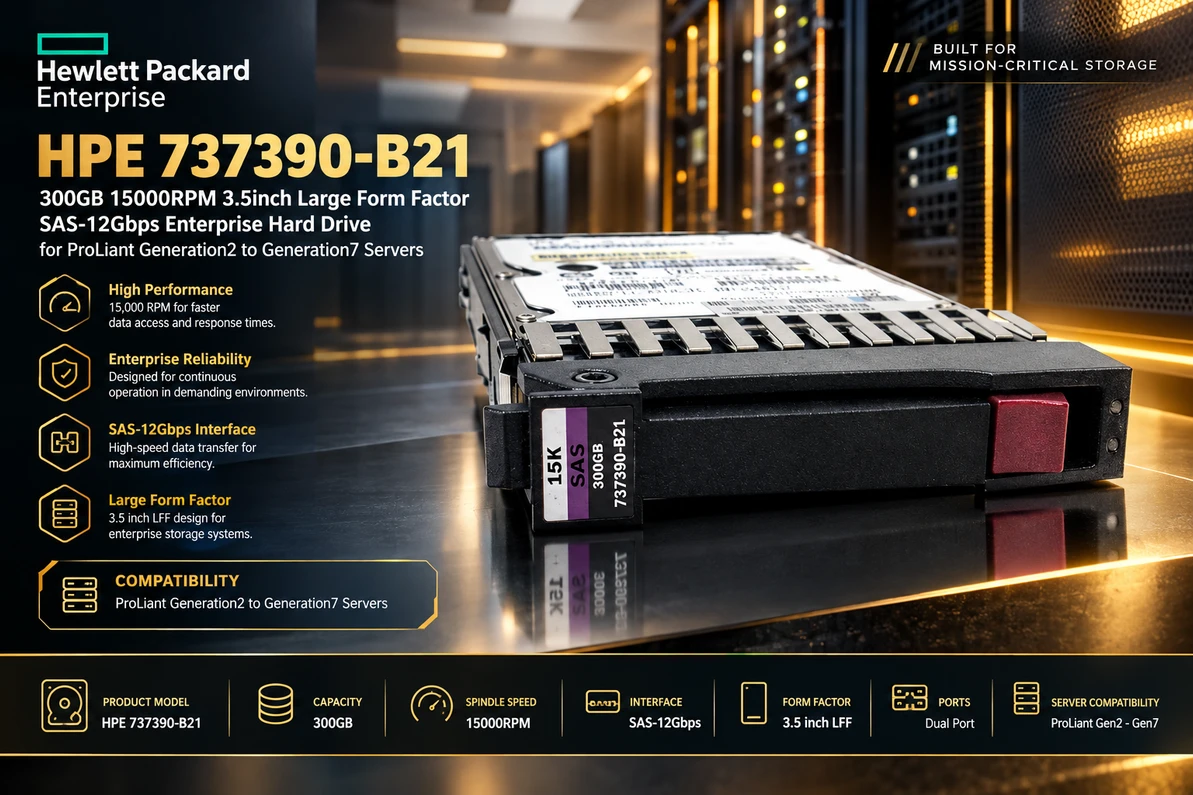
HPE 737390-B21: Unleashing Enterprise-Class Speed and Reliability with a 300GB 15K SAS Hard Drive
In the demanding world of enterprise computing, storage performance plays a vital role in keeping applications responsive, business operations efficient, and critical data accessible. The HPE 737390-B21 300GB 15000RPM 3.5-inch Large Form Factor SAS-12Gbps Enterprise Hard Drive is designed for organizations seeking dependable storage performance for compatible HPE ProLiant server environments. With its high rotational speed, enterprise-oriented design, and SAS connectivity, this drive represents a practical storage option for businesses maintaining established server infrastructure.
Whether you are refreshing an existing server, expanding storage capacity, or replacing a failed drive, choosing the correct enterprise hard drive is essential. Compatibility, interface requirements, drive dimensions, and workload demands all influence how effectively a storage component performs within a server environment.
This guide explores the HPE 737390-B21, its key specifications, potential applications, performance characteristics, compatibility considerations, and the factors businesses should evaluate before purchasing an enterprise hard drive.
Understanding the HPE 737390-B21 Enterprise Hard Drive
Built for Demanding Server Environments
The HPE 737390-B21 is identified by its 300GB storage capacity, 15,000 RPM rotational speed, 3.5-inch Large Form Factor design, and SAS-12Gbps interface. These characteristics position it within the category of performance-oriented enterprise storage hardware.
Enterprise hard drives differ from ordinary desktop drives in their intended operating environments and system integration requirements. Servers frequently handle multiple simultaneous requests, sustained workloads, and applications that depend on predictable storage access. Selecting a suitable enterprise drive can help businesses maintain an appropriate balance between performance, capacity, and infrastructure costs.
For organizations operating compatible legacy ProLiant servers, a correctly matched replacement drive can help extend the useful life of existing hardware without requiring an immediate migration to an entirely new storage platform.
What Makes This Drive Relevant for Enterprise Storage?
The combination of a 15K RPM spindle speed and a SAS interface is particularly relevant when applications require frequent access to stored information. Rotational speed influences the time a mechanical drive takes to position data beneath its read/write heads, while the interface determines how the drive communicates with the host storage controller.
However, actual performance depends on more than the drive's headline specifications. The storage controller, RAID configuration, workload characteristics, system firmware, and condition of the surrounding hardware can all affect results.
HPE 737390-B21 Specifications at a Glance
Key Product Specifications
The following table summarizes the product characteristics stated in the supplied product description.
| Specification | Details |
|---|---|
| Manufacturer | Hewlett Packard Enterprise (HPE) |
| Part number | 737390-B21 |
| Storage capacity | 300GB |
| Rotational speed | 15,000 RPM |
| Form factor | 3.5-inch Large Form Factor (LFF) |
| Interface | SAS-12Gbps |
| Product category | Enterprise internal hard drive |
| Intended platform range | ProLiant Generation 2 to Generation 7, as stated in the product title |
| Primary purpose | Enterprise server storage and compatible drive replacement |
Before ordering, verify the complete part number, drive model, carrier type, firmware requirements, and server compatibility against the official documentation for your particular system. A part number or interface specification alone does not guarantee that a drive will work in every server within a broad generation range.
How 15,000 RPM Performance Supports Business Workloads
Faster Mechanical Access for Frequent Requests
A hard drive's rotational speed is one of the factors that influences mechanical storage latency. At 15,000 revolutions per minute, the platters rotate rapidly, reducing the average rotational waiting time compared with slower-spinning mechanical drives.
This characteristic can be beneficial in workloads involving repeated access to relatively small amounts of information, especially when requests are distributed across different locations on the drive.
Potential use cases include transactional applications, frequently accessed operational records, and certain database workloads running on compatible storage infrastructure. Nevertheless, application performance depends on the complete system, and not every workload will benefit equally from a high-speed mechanical drive.
Supporting Responsive Enterprise Applications
Business applications often depend on a combination of processor performance, memory availability, network connectivity, and storage responsiveness. When storage latency becomes a bottleneck, users may experience slower application responses or longer data-processing times.
A 15K enterprise hard drive can help address some mechanical storage latency limitations in suitable environments. It may be particularly useful when maintaining an established storage architecture that was designed around high-speed SAS hard drives.
For applications with highly random workloads or strict latency requirements, businesses should also compare the drive's expected performance with modern solid-state storage alternatives before making a purchasing decision.
Understanding the SAS-12Gbps Interface
Reliable Communication Between the Drive and Server
Serial Attached SCSI, commonly known as SAS, is an interface technology used in enterprise storage systems. SAS is designed to support server and storage environments where consistent communication between drives, controllers, and other storage components is important.
The SAS-12Gbps designation indicates a nominal interface signaling rate of 12 gigabits per second. It should not be confused with the actual sustained data-transfer speed of the mechanical drive. Real-world throughput depends on the drive's mechanics, data location, controller, workload, and other system limitations.
For an organization upgrading or replacing storage hardware, the interface must match the capabilities of the server's storage controller and backplane. Connector appearance alone is not sufficient to establish compatibility.
Why Controller Compatibility Matters
Older ProLiant servers may use different storage controllers, backplanes, firmware versions, and drive carrier designs. Although some SAS technologies support backward-compatible operation under suitable conditions, the specific drive and system combination must still be supported.
Before purchasing the HPE 737390-B21, check the server's documentation to confirm supported drive interfaces, negotiated link speeds, drive capacities, and any required firmware or configuration settings.
The Benefits of a 3.5-Inch Large Form Factor Drive
Designed for Compatible LFF Drive Bays
The 3.5-inch Large Form Factor, or LFF, is a physical drive format used in various server and storage platforms. An LFF drive is not interchangeable with a 2.5-inch Small Form Factor drive simply because both use a SAS interface.
The server must have an appropriate LFF drive bay, backplane, and supported carrier. Some systems also require specific mounting hardware or a particular hot-plug configuration.
Correct physical compatibility helps ensure that the drive can be installed securely and connected properly to the server's storage subsystem.
Balancing Capacity and Performance
With 300GB of storage, this drive is better suited to targeted enterprise storage requirements than to large-scale bulk-capacity needs. Its potential value lies in combining relatively modest capacity with a high rotational speed and an enterprise SAS interface.
Businesses may use drives of this class for particular application volumes, compatible RAID arrays, legacy workloads, or replacements where matching the original hardware is more important than maximizing capacity per drive bay.
For capacity-intensive workloads, higher-capacity hard drives or SSDs may provide a better fit, depending on budget, application requirements, and platform compatibility.
Enterprise Applications for the HPE 737390-B21
Database and Transaction Processing
Databases can generate frequent reads and writes, particularly when processing transactions, updating records, or retrieving information requested by applications. High rotational speed may help reduce rotational latency for certain random-access workloads.
The drive may be considered for compatible database environments where an existing mechanical SAS storage architecture remains in service. However, database performance also depends on caching, memory, transaction patterns, RAID design, and write-protection policies.
Virtualization and Business Applications
Virtualization platforms consolidate multiple workloads onto shared physical infrastructure. Depending on the hypervisor, storage design, and number of active virtual machines, the underlying storage system may experience substantial random input/output activity.
A high-speed SAS hard drive can remain useful in some legacy virtualization environments, especially when preserving compatibility with existing hardware is a priority. Organizations should evaluate aggregate input/output requirements rather than assuming that rotational speed alone will guarantee satisfactory virtual machine performance.
Enterprise File and Operational Storage
The drive may also suit selected file-serving, departmental application, and operational storage workloads when the host platform explicitly supports the product.
Its 300GB capacity makes it important to assess expected data growth, redundancy requirements, backup policies, and available drive bays before deployment. For larger file repositories, capacity-oriented alternatives may be more economical.
Maintaining Legacy ProLiant Infrastructure
Many businesses continue operating older servers because they support stable applications, specialized software, or established workflows. Replacing a failed drive with a compatible enterprise component can help preserve these investments.
A replacement should match the system's supported specifications rather than being selected solely because it shares a similar capacity or connector. Confirming the exact drive and carrier requirements helps reduce installation issues and unnecessary downtime.
Reliability, Data Protection, and RAID Considerations
Enterprise Storage Requires a Complete Protection Strategy
An enterprise-class drive is only one component of a reliable storage environment. RAID configuration, monitoring, controller health, cooling, power stability, and backup practices all contribute to protecting business data.
For example, a supported redundant RAID configuration may allow a system to remain operational after a drive failure, depending on the RAID level and the condition of the remaining array. RAID does not replace backups, and it cannot protect against every form of data loss.
Organizations should maintain tested backups, monitor drive health indicators, investigate storage alerts promptly, and follow documented replacement procedures.
Firmware and System Monitoring
Firmware compatibility can influence drive recognition, reporting, and behavior within an enterprise server. Before installing a replacement, verify whether the system requires a particular firmware revision or HPE-supported configuration.
After installation, check the server's storage management utilities for drive status, controller alerts, and array health. If a drive is intended to replace a failed member of a RAID array, follow the controller manufacturer's recommended rebuild procedure and verify that the rebuild completes successfully.
Compatibility with HPE ProLiant Generation 2 to Generation 7 Servers
Verify the Exact Server Model
The product description identifies the HPE 737390-B21 as intended for ProLiant Generation 2 through Generation 7 servers. Because these systems span multiple hardware generations, compatibility should not be assumed across the entire range without model-specific verification.
Different servers can use different drive cages, backplanes, controllers, carrier styles, and firmware requirements. A drive that works in one ProLiant configuration may not be supported in another.
Before ordering, identify the exact ProLiant model, storage controller, drive bay type, and existing drive part number. Compare those details with the server's supported drive options and the supplier's product documentation.
Check Carrier and Hot-Plug Requirements
Some enterprise drives are supplied with a carrier designed for a particular server family. Other configurations may use different mounting arrangements. The correct carrier is important for proper installation and connection to the backplane.
Do not assume that this particular part includes a specific Smart Carrier, hot-plug carrier, or other accessory unless the supplier's listing confirms it. Verify the actual item being sold, including whether the carrier is included and whether the drive is new, refurbished, or used.
What to Consider Before Buying the HPE 737390-B21
Confirm the Part Number and Physical Condition
Check that the item is listed as HPE 737390-B21 and that its capacity, rotational speed, form factor, and interface match your requirements. Ask the supplier to clarify any differences between the advertised specification and the physical drive label.
The product's condition also matters. New, refurbished, and used drives can differ in price, remaining service life, warranty coverage, and available testing records.
Evaluate Capacity and Workload Needs
A 300GB drive may be suitable when replacing an existing unit or maintaining a storage array designed around similar capacities. For new installations, consider whether the capacity is sufficient for current data and future growth.
Assess the application's random and sequential input/output patterns, expected workload intensity, required response times, and redundancy needs. This helps determine whether a 15K mechanical SAS drive remains a sensible choice.
Review Warranty and Return Terms
Enterprise drives are often used in environments where downtime is costly. Review the seller's warranty, return policy, testing standards, and replacement process before buying.
For mission-critical systems, also consider how quickly a replacement can be supplied and whether a tested spare drive should be kept on hand.
Installation and Maintenance Best Practices
Prepare the Server Before Installation
Start by checking the server manufacturer's service instructions and following the required shutdown or hot-plug procedure for the specific model. Back up important data and verify the health of the existing storage array before replacing a drive.
Use appropriate electrostatic discharge precautions and handle the drive by its edges. Avoid touching exposed circuitry or forcing the drive into a bay.
Confirm Detection and Array Health
After installation, verify that the controller recognizes the drive and reports its expected capacity and status. If the drive is part of a RAID array, confirm that the controller identifies it as the correct replacement and begins any required rebuild process.
Monitor the array until it returns to a healthy state. Avoid unnecessary workload changes during rebuilding, and retain verified backups in case another drive or controller component fails.
Maintain a Proactive Storage Routine
Regular maintenance can help identify developing issues before they cause serious disruption. Review storage logs, check drive-health alerts, monitor operating temperatures, and ensure that cooling systems and power supplies are functioning correctly.
Document drive replacements and update inventory records with part numbers, serial numbers, installation dates, and warranty details where appropriate.
HPE 737390-B21 Compared with Modern SSD Storage
When a Mechanical SAS Drive Still Makes Sense
The HPE 737390-B21 may remain a reasonable option when the priority is replacing a compatible drive in an existing server. Matching the established interface, physical format, and storage configuration can reduce the complexity of maintaining older infrastructure.
A replacement hard drive may also be more practical than a platform-wide storage migration when the existing application has modest requirements and the server remains supported by the organization's operational processes.
When an SSD May Be the Better Choice
Solid-state drives have no spinning platters or mechanical read/write heads. As a result, compatible enterprise SSDs can deliver much lower access latency and substantially higher input/output performance for many workloads.
If the goal is to accelerate virtualization, database processing, or latency-sensitive applications, compare a suitable SSD's endurance rating, interface, capacity, compatibility, and total cost of ownership with those of a mechanical hard drive.
The best option depends on the server's capabilities and the workload's actual needs. A newer storage technology is not automatically a drop-in replacement for an older SAS drive.
Conclusion: A Targeted Storage Choice for Established Enterprise Systems
The HPE 737390-B21 300GB 15000RPM 3.5-inch LFF SAS-12Gbps Enterprise Hard Drive offers a combination of high rotational speed, enterprise SAS connectivity, and a traditional large-form-factor design. These characteristics make it worth considering for compatible server maintenance, targeted storage expansion, and selected workloads running on established HPE ProLiant infrastructure.
Its most important strengths are its 15K RPM mechanical design and its intended role in enterprise storage environments. Nevertheless, the relatively modest 300GB capacity and the need for precise compatibility checks should guide purchasing decisions.
For businesses maintaining older ProLiant servers, the right replacement drive can help preserve existing infrastructure and avoid unnecessary hardware changes. Confirm the exact server model, controller support, carrier requirements, product condition, and warranty before ordering. With careful selection and appropriate maintenance, a compatible enterprise drive can continue serving a useful role in a well-managed storage environment.
Recent Posts
-
HPE 737390-B21: Unleashing Enterprise-Class Speed and Reliability with a 300GB 15K SAS Hard Drive
In the demanding world of enterprise computing, storage performance plays a vital role in keeping ap …Oct 14th 2026 -
HPE 516814-B21: The 15K SAS Storage Workhorse for Legacy ProLiant Servers
HPE 516814-B21: Reviving Enterprise Performance with 300GB of 15K SAS Storage Power Introduction: De …Oct 13th 2026 -
HPE 516824-B21: Unleashing Enterprise Storage Performance with 300GB 15K RPM SAS Technology
Introduction: Reliable Storage for Demanding Enterprise Environments In today's data-driven business …Oct 12th 2026