
HPE 492620-B21: The Compact Storage Workhorse Keeping ProLiant Servers Reliable, Responsive, and Ready for Business
Introduction: Dependable Enterprise Storage for Established ProLiant Servers
Reliable storage is essential to every server environment. From business applications and shared files to databases and internal systems, organizations depend on their storage hardware to keep important information accessible and workloads running smoothly. While modern storage technologies offer impressive speed and capacity, many businesses continue to operate established server platforms that require compatible, dependable replacement components.
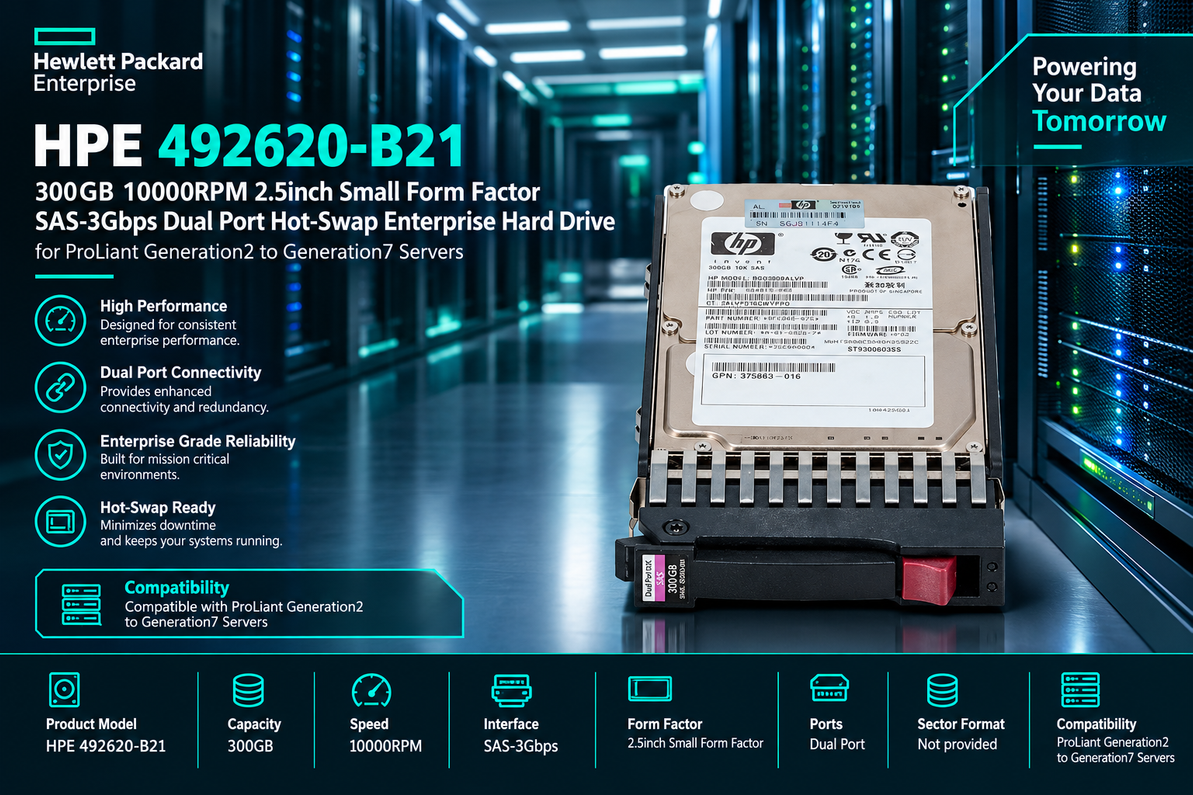
The HPE 492620-B21 300GB 10000RPM 2.5-inch Small Form Factor SAS-3Gbps Dual Port Hot-Swap Enterprise Hard Drive is designed for enterprise storage environments that prioritize compatibility, practical performance, and straightforward hardware maintenance. With a 300GB storage capacity, 10,000 RPM rotational speed, SAS-3Gbps interface, and dual-port connectivity, this hard drive represents a storage option for organizations maintaining compatible HPE ProLiant Generation 2 through Generation 7 servers.
Its 2.5-inch Small Form Factor (SFF) design supports compact server configurations, while its hot-swap capability can simplify drive replacement in supported systems. These characteristics make the drive worth considering for server maintenance, replacement storage, and legacy infrastructure support.
Whether you are an IT administrator, server maintenance professional, system integrator, or enterprise hardware reseller, understanding the specifications and compatibility requirements of the HPE 492620-B21 can help you make an informed purchasing decision.
HPE 492620-B21 Hard Drive: Key Specifications
Product Overview
The HPE 492620-B21 combines several important characteristics associated with traditional enterprise hard disk drives. Before selecting it for a server, buyers should understand what each specification means for storage capacity, connectivity, and system compatibility.
-
Brand: HPE (Hewlett Packard Enterprise)
-
Product Number: 492620-B21
-
Storage Capacity: 300GB
-
Rotational Speed: 10,000 RPM
-
Form Factor: 2.5-inch Small Form Factor (SFF)
-
Interface: Serial Attached SCSI (SAS)
-
Interface Transfer Rate: 3Gbps
-
Connectivity: Dual-port SAS
-
Drive Type: Enterprise hard disk drive (HDD)
-
Installation Feature: Hot-swap, when supported by the server configuration
-
Intended Compatibility: HPE ProLiant Generation 2 through Generation 7 servers, subject to exact model and configuration verification
These specifications reflect the product description provided. Before ordering, confirm the precise part number, drive firmware, carrier type, and supported server list with the supplier or official system documentation. Enterprise drives can have similar specifications while differing in firmware, sector format, or physical configuration.
300GB Storage Capacity for Everyday Enterprise Workloads
Practical Storage for Established Applications
A 300GB hard drive provides space for operating system files, application data, departmental documents, and selected business databases. Although 300GB is relatively modest by modern storage standards, it can still be appropriate for older servers with clearly defined storage requirements.
For organizations maintaining legacy applications, replacing a failed drive with a compatible unit can be more practical than immediately redesigning the entire storage environment. A replacement drive may help restore the existing configuration while allowing the business to plan future upgrades separately.
The HPE 492620-B21 may be considered for workloads that do not require substantial storage expansion, provided the drive is supported by the target system and meets the application's capacity and performance requirements.
Supporting Existing Server Investments
Enterprise server hardware often remains in service because it supports specialized applications, established workflows, or infrastructure that would be costly to replace all at once. A compatible replacement drive can help maintenance teams preserve these investments.
However, businesses should evaluate the total cost of keeping older equipment operational, including maintenance, energy consumption, spare-part availability, and security support. A replacement hard drive can address a storage component failure, but it cannot resolve every limitation associated with aging server hardware.
10,000 RPM Rotational Speed for Responsive Data Access
How Rotational Speed Affects Performance
The HPE 492620-B21 is specified to operate at 10,000 revolutions per minute (RPM). In a mechanical hard drive, magnetic platters rotate while read/write heads move to access stored information.
Rotational speed influences how long the drive may need to wait for a requested sector to rotate into position. Higher RPM generally reduces rotational latency compared with otherwise similar drives operating at lower speeds.
This characteristic can be beneficial for certain server workloads involving frequent access to stored information. Examples include selected transactional applications, shared files, and business systems that rely on mechanical storage.
Actual performance depends on more than RPM. Factors such as seek time, controller capabilities, workload patterns, queue depth, caching, and the number of active drives all affect the experience delivered by the complete storage system.
Balancing Performance with Legacy Requirements
A 10,000 RPM enterprise HDD can provide useful performance for compatible older server configurations. Nevertheless, it should not be considered equivalent to a modern SSD in workloads that demand very low latency or high random input/output performance.
For businesses maintaining ProLiant Generation 2 through Generation 7 systems, the practical objective may be to restore the original storage functionality rather than achieve the performance of a newer server platform.
Selecting a drive that meets the requirements of the existing system can help avoid unnecessary configuration changes while keeping maintenance focused on the component that needs replacement.
SAS-3Gbps Interface for Compatible Enterprise Storage
Understanding the SAS Interface
Serial Attached SCSI, commonly known as SAS, is a storage interface designed for enterprise systems. It enables communication between storage devices and compatible controllers, providing a connection technology used in servers and storage arrays.
The HPE 492620-B21 is described as using a SAS-3Gbps interface. This represents the interface's signaling rate, not the guaranteed speed at which the hard drive reads or writes files.
Actual throughput is also limited by the mechanical drive mechanism, controller, storage configuration, and workload. As a result, a 3Gbps SAS interface should not be interpreted as a promise of 3Gbps application-level data transfer.
Why Interface Compatibility Matters
Choosing the correct interface is essential when replacing an enterprise hard drive. The target server must have a compatible storage controller and backplane, and the drive must be supported by the system's hardware and firmware.
Although newer SAS generations may offer higher interface rates, a faster interface does not automatically make a drive suitable for every older server. Compatibility depends on the complete configuration, including controller support, drive firmware, physical connector, carrier, and other platform-specific requirements.
Before purchasing the HPE 492620-B21, verify that the intended ProLiant server supports the drive's SAS interface and that the existing storage architecture can use it correctly.
Dual-Port SAS Connectivity for Enterprise Storage
What Dual-Port Connectivity Means
Dual-port SAS drives provide two physical communication paths to the storage device. In a supported architecture, these paths may connect through separate controller or expander routes to provide redundant access.
If one supported path fails, a properly configured system may continue communicating with the drive through the other path. This can improve resilience against certain connection or component failures.
However, dual-port capability alone does not guarantee uninterrupted service. The complete infrastructure must support the required paths, controllers, cabling, expanders, and multipathing configuration.
Supporting Storage Availability
For business environments where access to important data must be maintained, storage-path redundancy can be a useful design feature. It may help reduce the impact of a single path failure when the surrounding server or storage architecture is configured for failover.
Administrators should confirm whether their particular ProLiant configuration supports dual-path operation. A drive connected through only one active path will not provide the same level of path redundancy as a fully configured multipath system.
It is also important to distinguish path redundancy from drive redundancy. A dual-port drive does not protect against every mechanical failure, accidental deletion, data corruption event, or other cause of data loss. Appropriate backups and recovery procedures remain essential.
Hot-Swap Design for Simplified Server Maintenance
What Is a Hot-Swap Hard Drive?
A hot-swap hard drive can be removed and replaced while the server remains powered on, provided the server chassis, drive bay, controller, and storage configuration support this procedure.
This capability can simplify maintenance by reducing the need to shut down the entire server when a supported drive requires replacement. For organizations operating business applications or shared infrastructure, avoiding unnecessary downtime can be valuable.
The HPE 492620-B21 is described as a hot-swap enterprise hard drive. Buyers should confirm whether the required carrier is included and whether the target server supports hot-swap operation with the exact drive configuration.
Maintenance Benefits for IT Teams
Hot-swap functionality can help maintenance teams respond to drive failures more efficiently. Instead of scheduling a complete server shutdown in a supported configuration, technicians may be able to replace the affected drive while other services continue running.
However, not every server bay or controller supports hot-plug replacement. Administrators must follow the manufacturer's maintenance procedures and verify the drive's status before removing it.
When the drive is part of a RAID array, incorrect removal or replacement can place the array at risk. Always confirm the failed or degraded member, identify the correct bay, and follow the controller's documented replacement and rebuild procedure.
2.5-Inch Small Form Factor Design for Space-Efficient Storage
Compact Hardware for Server Environments
The 2.5-inch Small Form Factor design is used in server configurations that accommodate compact hard drives. Depending on the chassis, this form factor can allow multiple drives to be installed within a limited amount of rack space.
A compact design can help businesses maintain organized storage configurations while supporting the physical requirements of their existing servers. It may also be convenient for service providers managing spare drives for several compatible systems.
Nevertheless, a 2.5-inch form factor does not guarantee universal physical compatibility. Enterprise drive carriers, connector arrangements, and mounting mechanisms can vary between server generations.
Check the Drive Carrier Before Buying
When replacing an existing drive, verify whether the HPE 492620-B21 is supplied with the appropriate hot-swap carrier. Some enterprise drives are sold as bare drive assemblies, while others are supplied with a carrier designed for a specific server family.
A bare drive may require the correct mounting hardware before installation. The connector and firmware configuration must also match the requirements of the target server.
Checking these details before purchase helps prevent delays and avoids confusion between drives that share the same capacity and form factor but have different installation requirements.
Potential Applications of the HPE 492620-B21
Legacy Application Servers
Businesses running established applications may need replacement storage that matches their existing infrastructure. A compatible 300GB, 10,000 RPM SAS hard drive may be suitable for defined workloads that do not require a major increase in capacity.
Before deployment, administrators should evaluate the application's storage requirements and confirm that the server platform remains appropriate for the intended use.
File and Departmental Servers
Small file repositories, internal business documents, and selected departmental workloads may be suitable for traditional mechanical storage. Whether 300GB is sufficient depends on the quantity of stored information, expected growth, access patterns, and retention requirements.
Organizations should also consider whether users depend on rapid access to large files or databases. Workloads with demanding latency requirements may benefit from SSD storage or a broader platform upgrade.
RAID-Based Storage Systems
The HPE 492620-B21 may be considered for a supported RAID configuration if the storage controller recognizes the drive and the relevant compatibility requirements are met.
Before replacing a RAID member, verify the required capacity, sector format, controller support, and firmware compatibility. Do not assume that a drive will rebuild an existing array successfully simply because it has the same nominal capacity.
RAID can help maintain service availability in supported configurations, but it is not a replacement for independent backups. Businesses should regularly test their backup and recovery processes.
Server Repair and Spare-Part Inventory
IT service providers, resellers, and internal infrastructure teams may keep compatible drives available to reduce repair delays. An accurately identified spare can help restore a supported server more quickly when a drive fails.
For effective inventory management, record the product number, interface, capacity, form factor, carrier type, condition, and warranty information. Maintaining accurate spare-part records makes it easier to select the correct replacement when service is required.
Compatibility with HPE ProLiant Generation 2 Through Generation 7 Servers
Why Server Compatibility Must Be Verified
The product description identifies the HPE 492620-B21 for ProLiant Generation 2 through Generation 7 servers. However, this does not establish compatibility with every server model or every storage configuration within those generations.
ProLiant systems differ in their storage controllers, backplanes, drive cages, firmware, and supported interfaces. A drive that works in one configuration may not be suitable for another, even when both systems belong to the same general server generation.
Before placing an order, check the exact server model and its supported drive options. Confirm that the controller and backplane support the drive's interface and that the required carrier and firmware are appropriate.
Pre-Purchase Compatibility Checklist
-
Verify the HPE 492620-B21 product number with the supplier.
-
Confirm the exact ProLiant server model and supported drive list.
-
Check the SAS controller and backplane requirements.
-
Confirm the 2.5-inch drive bay and hot-swap carrier configuration.
-
Verify RAID capacity, sector format, and firmware requirements where applicable.
-
Review the drive's condition, warranty, and return policy.
-
Confirm that recent backups are available before carrying out storage maintenance.
Taking these steps helps reduce compatibility issues and supports a more predictable installation process.
Installation and Maintenance Best Practices
Prepare the Server Carefully
Before installing the replacement drive, review the server's maintenance documentation. Determine whether the drive bay supports hot-plug replacement and whether any controller-specific procedure must be followed.
If the drive is part of a RAID array, check the array's current health and identify the correct drive before removing anything. Where hot-swap replacement is unsupported, shut down the server using the documented procedure.
Always handle storage hardware carefully and avoid removing a functioning drive simply because it appears similar to a failed unit.
Check Drive Status After Installation
After installation, verify that the controller detects the drive and reports its expected capacity and status. If the drive is being used to replace a failed RAID member, follow the documented rebuild or synchronization process.
Monitor the array until rebuilding has completed and check for controller alerts or unexpected errors. A drive that is physically installed but incorrectly recognized may require further compatibility checks.
Maintain Backups and Monitor Storage Health
Regular monitoring can help administrators identify potential storage problems. Depending on the controller and platform, useful information may include drive health, predictive failure alerts, error logs, temperature, and array status.
Maintain independent backups and periodically test data recovery. Even a properly functioning enterprise hard drive can fail, and neither enterprise classification nor RAID configuration eliminates every risk.
HPE 492620-B21 Compared with Modern Storage Technologies
When a Traditional Enterprise HDD Is a Practical Choice
A mechanical hard drive can remain useful when an organization needs a compatible replacement for an established server rather than a complete storage redesign.
Keeping the original storage technology may reduce the scope of a repair and help preserve existing controller and application configurations. For legacy infrastructure, a supported replacement drive may be a practical short-term maintenance decision.
The HPE 492620-B21's 300GB capacity and 10,000 RPM rotational speed should nevertheless be evaluated against the workload's actual requirements.
When an SSD Upgrade Is Worth Considering
Solid-state drives use flash memory instead of rotating magnetic platters. They generally provide lower latency and higher random input/output performance than mechanical hard drives.
Businesses considering an upgrade should compare the required capacity, performance, endurance, interface support, power consumption, and total cost. An SSD must still be compatible with the server's controller and backplane, particularly in older ProLiant systems.
For organizations with demanding application workloads, an SSD-based configuration may offer meaningful performance advantages. For a straightforward replacement in a supported legacy system, a compatible mechanical drive may be the more focused solution.
What to Consider When Buying the HPE 492620-B21
Verify the Exact Product Configuration
Enterprise storage products can have similar descriptions but different product numbers, firmware variants, or carrier configurations. Confirm that the supplied drive is actually the HPE 492620-B21 and matches the intended server requirements.
Do not rely on capacity and rotational speed alone when choosing a replacement. The SAS interface, sector format, controller support, and carrier configuration can all affect compatibility.
Evaluate Condition and Warranty
When purchasing refurbished or previously used enterprise hardware, consider the seller's testing procedures, warranty, return policy, and available drive-health information.
A lower purchase price may not represent the best overall value if the drive has an uncertain service history or limited return protection. For business-critical workloads, prioritize traceable product identification and a supplier that clearly explains the drive's condition.
Conclusion: A Practical Storage Option for Legacy ProLiant Infrastructure
The HPE 492620-B21 300GB 10000RPM 2.5-inch Small Form Factor SAS-3Gbps Dual Port Hot-Swap Enterprise Hard Drive is a potential replacement option for organizations maintaining compatible HPE ProLiant Generation 2 through Generation 7 servers.
Its 10,000 RPM rotational speed, dual-port SAS connectivity, compact form factor, and hot-swap design address several practical requirements associated with traditional enterprise storage. The 300GB capacity may be sufficient for selected legacy applications, server maintenance tasks, and defined workloads that do not require additional storage space.
However, successful deployment depends on confirming the exact server and controller compatibility, drive carrier requirements, and storage configuration. Businesses should also evaluate the individual drive's condition, maintain reliable backups, and monitor storage health after installation.
For IT administrators, hardware resellers, and server maintenance teams, the key is choosing a drive that matches the existing infrastructure rather than relying on specifications alone. With appropriate verification and installation procedures, the HPE 492620-B21 can be considered as part of a targeted legacy server maintenance strategy.
Recent Posts
-
HPE 492620-B21: The Compact Storage Workhorse Keeping ProLiant Servers Reliable, Responsive, and Ready for Business
Introduction: Dependable Enterprise Storage for Established ProLiant Servers Reliable storage is ess …Oct 8th 2026 -
Compact Powerhouse: How the HPE AM244A 300GB Enterprise Hard Drive Keeps Legacy ProLiant Servers Running Strong
Introduction: Reliable Storage for Demanding Server Environments Enterprise servers need dependable …Oct 7th 2026 -
Small Drive, Serious Power: The HPE 537809-B21 300GB Enterprise Hard Drive Built for Reliable Server Performance
HPE 537809-B21 300GB 10000RPM SAS-6Gbps Enterprise Hard Drive: Reliable Storage for ProLiant Servers …Oct 6th 2026