
HPE P04693-B21: Ignite Your Enterprise with 300GB of 15K RPM Storage Performance
In today's data-driven business environment, server storage plays a crucial role in keeping applications responsive, services accessible, and business operations running smoothly. From database transactions and enterprise applications to virtualization and essential business data, organizations depend on storage hardware that delivers dependable performance and integrates seamlessly with their existing infrastructure.
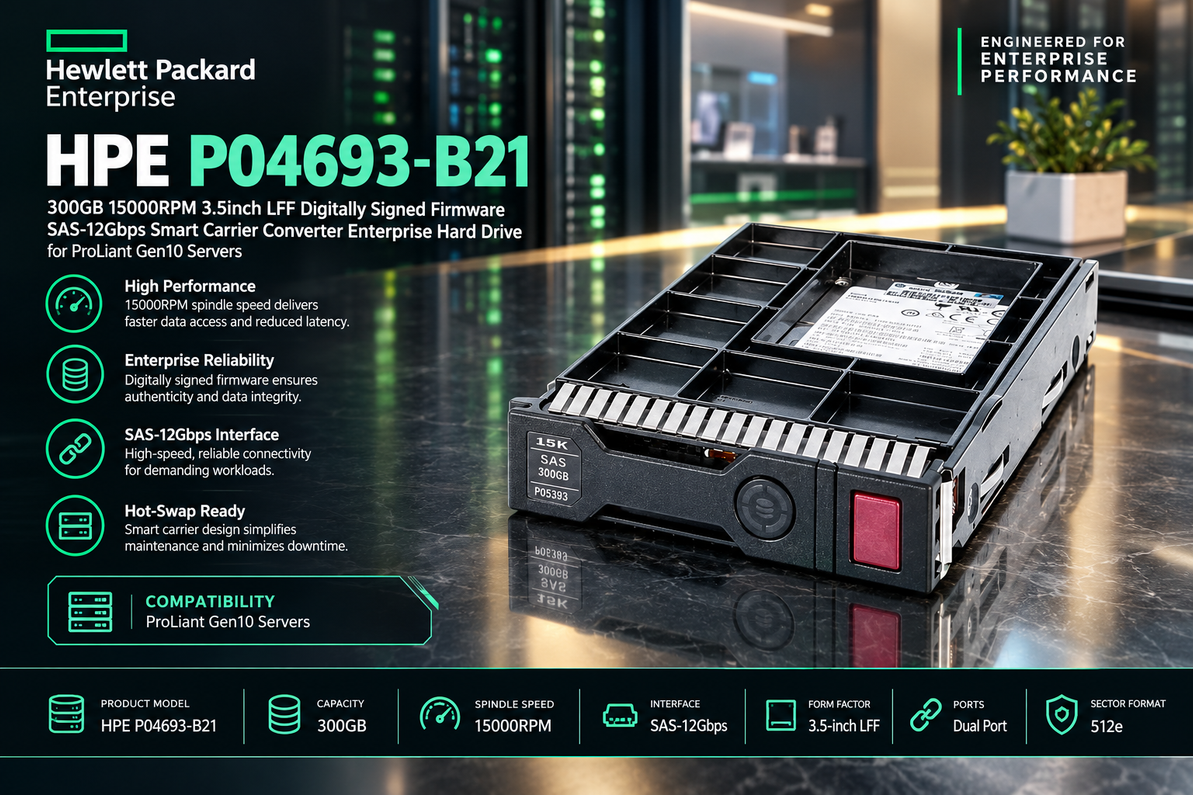
The HPE P04693-B21 300GB 15000RPM 3.5-inch LFF SAS-12Gbps Enterprise Hard Drive is designed for compatible HPE ProLiant Gen10 server configurations that require high-speed mechanical storage. With its 15,000 RPM rotational speed, SAS-12Gbps interface, digitally signed firmware, and Smart Carrier Converter configuration, this drive offers an enterprise storage option for organizations maintaining or upgrading supported server environments.
Whether you are replacing a failed drive, expanding an existing storage array, or maintaining a consistent hardware configuration across your data center, understanding the features of the HPE P04693-B21 can help you select the right component for your infrastructure.
Understanding the HPE P04693-B21 Enterprise Hard Drive
Designed for Enterprise Server Storage
The HPE P04693-B21 is identified by its 300GB capacity, 15K RPM rotational speed, 3.5-inch Large Form Factor design, and 12Gbps SAS interface. These characteristics make it relevant to enterprise environments where storage responsiveness, hardware compatibility, and consistent server operation are important.
Enterprise hard drives differ from typical desktop drives in their intended deployment environments, qualification requirements, and integration with supported server platforms. They are commonly used in systems that run business applications, manage databases, host virtual machines, and support other organizational workloads.
For IT administrators, the most important consideration is ensuring that the drive matches the server's storage controller, backplane, firmware requirements, and physical carrier configuration.
Key Product Specifications
| Specification | Details |
|---|---|
| Manufacturer | Hewlett Packard Enterprise (HPE) |
| Model / Part Number | P04693-B21 |
| Storage Capacity | 300GB |
| Rotational Speed | 15,000 RPM |
| Form Factor | 3.5-inch Large Form Factor (LFF) |
| Interface | Serial Attached SCSI (SAS) |
| Interface Data Rate | 12Gbps |
| Firmware | Digitally signed firmware |
| Carrier Configuration | Smart Carrier Converter, as specified in the product title |
| Product Category | Enterprise hard disk drive |
| Intended Platform | Compatible HPE ProLiant Gen10 servers |
Confirm the exact product configuration against HPE documentation before purchasing. The server model, drive bay, controller, and carrier requirements determine whether a particular drive is supported.
15,000 RPM Rotational Speed for Responsive Storage
How High-Speed Mechanical Storage Works
A mechanical hard drive stores information on rotating magnetic platters. Its read/write heads move to the required locations to access or record data. The rotational speed affects how long the drive may need to wait for the requested data to pass beneath the heads.
At 15,000 revolutions per minute, the HPE P04693-B21 belongs to the high-speed mechanical drive category. Compared with slower mechanical drives, a 15K RPM drive can offer lower rotational latency, making it potentially useful for applications that frequently access smaller amounts of data across different disk locations.
This characteristic can be valuable for certain database workloads, transactional applications, and established enterprise systems where random-access performance remains important.
Supporting Business-Critical Applications
Enterprise applications frequently perform multiple storage operations at the same time. A server might process user requests, retrieve application records, update databases, and write operational logs simultaneously.
In these situations, storage responsiveness can influence the overall user experience and the efficiency of application processing. A high-speed SAS hard drive can provide a practical mechanical storage option when its performance characteristics match the application's requirements.
However, rotational speed alone does not determine real-world performance. Controller capabilities, RAID configuration, queue depth, workload patterns, and the number of active drives also influence storage performance.
SAS-12Gbps Interface for Enterprise Connectivity
Understanding 12Gbps SAS Technology
Serial Attached SCSI, commonly known as SAS, is an interface technology widely used in enterprise servers and storage systems. It supports communication between storage devices and compatible controllers, allowing drives to operate within managed enterprise storage configurations.
The HPE P04693-B21 is specified with a SAS-12Gbps interface. This refers to the nominal interface signaling rate, not the actual sustained data-transfer speed of the mechanical disk. Real-world throughput depends on the drive's physical capabilities and the rest of the storage system.
For organizations using compatible 12Gbps SAS infrastructure, the interface provides an appropriate connectivity option for supported storage configurations.
Compatibility with Storage Controllers
A SAS drive must be supported by the server's storage controller and backplane. Administrators should verify the controller model, available drive bays, supported drive types, and applicable firmware requirements before installation.
It is also important to consider the existing storage architecture. A replacement drive should be appropriate for the intended RAID configuration and supported by the server's storage-management tools.
Checking these requirements in advance can reduce installation problems and help maintain predictable server operations.
Digitally Signed Firmware for Controlled Hardware Environments
The Importance of Firmware Integrity
Firmware manages essential functions inside a hard drive, including device operation and communication with the host system. Digitally signed firmware is associated with mechanisms used to verify firmware authenticity and integrity within supported hardware and update processes.
In enterprise environments, firmware management is an important part of maintaining a consistent and controlled infrastructure. IT teams need to manage hardware versions, apply approved updates, and ensure that components operate within supported configurations.
The digitally signed firmware designation of the HPE P04693-B21 is therefore a relevant consideration for organizations that prioritize managed server hardware and established maintenance procedures.
Following Supported Firmware Procedures
Administrators should consult the relevant HPE documentation when checking firmware requirements or updating server storage components. Firmware compatibility may depend on the drive, controller, server platform, and installed management software.
Digitally signed firmware should not be interpreted as a guarantee of complete system security. Strong access controls, regular updates, monitoring, backups, and appropriate physical security remain necessary for protecting enterprise infrastructure.
Smart Carrier Converter and 3.5-Inch LFF Design
Understanding the Physical Configuration
The HPE P04693-B21 product title identifies a 3.5-inch Large Form Factor drive with a Smart Carrier Converter configuration. Physical compatibility is an important part of enterprise storage selection because servers can use different drive bays, carrier designs, and backplane arrangements.
The LFF designation describes the drive's physical form factor. The Smart Carrier Converter designation identifies an additional aspect of the supplied hardware configuration that buyers should verify against their intended server.
Not every 3.5-inch drive configuration is interchangeable, even when the drives share the same capacity and interface.
Why Carrier Compatibility Matters
The carrier or converter must match the server's supported installation arrangement. An incorrect configuration can prevent proper installation or interfere with drive-status monitoring and other supported management functions.
Before ordering, compare the part number and carrier arrangement of the existing drive with the replacement. Review the server's hardware documentation to confirm whether the specified configuration is supported.
This is especially important for organizations maintaining multiple ProLiant servers with different storage options.
Practical Applications of the HPE P04693-B21
Database and Transactional Workloads
Databases frequently perform read and write operations involving individual records, indexes, and transaction logs. Depending on the application and storage design, these operations can place substantial demands on random-access performance.
The HPE P04693-B21 may be suitable for compatible database environments where 300GB of capacity is sufficient and a high-speed mechanical SAS drive fits the existing architecture.
For particularly latency-sensitive databases, SSD storage may offer better performance. Administrators should evaluate actual workload requirements before selecting a storage medium.
Enterprise Business Applications
Business applications depend on reliable access to configuration files, operational records, and application data. Storage hardware must integrate correctly with the server platform to support predictable operations.
For organizations running compatible HPE ProLiant Gen10 servers, a properly matched replacement drive can help maintain an existing storage configuration without requiring an immediate infrastructure overhaul.
The drive's suitability depends on the application's capacity needs, performance expectations, and the server's supported hardware options.
Virtualization Environments
Virtualization enables multiple virtual machines to share a physical server. These virtual machines may access application files, operating systems, databases, and logs at the same time.
A 15K RPM mechanical drive may be useful in certain established virtualization environments, particularly when replacing an existing mechanical drive with a matching supported component.
However, workloads involving many simultaneous random I/O operations may benefit more from SSDs or other storage architectures designed for lower latency. Storage planning should account for the number of virtual machines, their activity levels, and the performance requirements of their applications.
General Enterprise Data Storage
The HPE P04693-B21 can also be considered for compatible business data and operational workloads that fit within its 300GB capacity.
Potential uses depend on the organization's storage policies, redundancy requirements, and available server resources. Administrators should assess data growth, backup requirements, and expected performance before assigning the drive to a particular workload.
Storage Reliability and Maintenance Best Practices
Monitor Drive Health
A dependable storage environment requires more than selecting a suitable hard drive. Cooling, stable power, compatible controllers, proper installation, and regular monitoring all contribute to maintaining healthy server operations.
Use supported HPE management utilities and storage-controller tools to review drive status and investigate warnings. Where supported, predictive alerts can help administrators identify potential hardware issues before they cause service interruptions.
Routine monitoring also helps IT teams identify capacity constraints and maintain a clearer picture of the storage environment.
Use RAID and Backup Strategies Appropriately
The HPE P04693-B21 may be used in a supported RAID configuration when the server and controller permit it. Depending on the RAID level, an array can provide redundancy, improve performance, or combine these benefits.
RAID does not replace independent backups. Organizations should maintain regular backups, test restoration procedures, and document recovery plans for important applications and business data.
These measures help protect against a wider range of incidents, including accidental deletion, software problems, and multiple hardware failures.
Plan Capacity Before Deployment
A nominal 300GB drive may be sufficient for selected enterprise workloads, dedicated application storage, or established systems with relatively limited storage requirements. It may not be appropriate for applications with large datasets or rapid data growth.
Before installation, estimate current storage usage, expected expansion, operating overhead, redundancy requirements, and available capacity elsewhere in the system.
Effective capacity planning can help prevent storage shortages and reduce the need for unplanned hardware purchases.
HPE P04693-B21 Compared with Enterprise SSDs
Mechanical Storage Versus Solid-State Technology
The HPE P04693-B21 uses mechanical storage technology, with spinning platters and moving read/write heads. Enterprise SSDs use flash memory and have no moving mechanical components.
A 15K RPM hard drive can offer a useful balance for organizations maintaining supported SAS-based infrastructure, but an SSD typically provides lower access latency and stronger random I/O performance.
The right choice depends on the workload, budget, capacity requirements, existing controller support, and the need to maintain compatibility with established hardware.
When a 15K RPM Hard Drive Is Appropriate
A high-speed mechanical SAS drive may be a practical choice when an organization needs to replace a matching drive, preserve a validated server configuration, or continue operating an existing mechanical storage array.
For a new deployment, it is worth comparing supported SSD options and considering expected workload growth. The highest spindle speed does not automatically make a mechanical drive the best option for every enterprise application.
Compatibility with HPE ProLiant Gen10 Servers
Verify the Exact Server and Controller
The HPE P04693-B21 is described as intended for HPE ProLiant Gen10 servers. Compatibility should be verified against the exact server model, storage controller, backplane, drive bay, and supported firmware configuration.
ProLiant Gen10 includes multiple server families and storage options, so a general generation designation is not enough to establish universal compatibility.
Review the relevant HPE QuickSpecs and storage documentation before placing an order.
Safe Installation and Replacement
Before replacing an existing drive, determine whether the specific server configuration supports hot-swap replacement. Do not remove a drive while the server is operating unless the hardware and maintenance procedure explicitly support that action.
Check the RAID array's health, verify that current backups are available, and follow the server's documented replacement procedure. After installation, confirm that the controller recognizes the drive and that the storage system reports a healthy status.
These precautions help reduce the risk of data loss and avoid unnecessary service interruptions.
Buying the HPE P04693-B21 Enterprise Hard Drive
What to Verify Before Purchasing
When sourcing the HPE P04693-B21, check the following details:
-
Part number: Confirm that the item is specifically identified as P04693-B21.
-
Capacity and speed: Verify 300GB and 15,000 RPM.
-
Interface: Confirm SAS-12Gbps support.
-
Physical design: Check the 3.5-inch LFF configuration.
-
Firmware: Verify the digitally signed firmware designation.
-
Carrier arrangement: Confirm the Smart Carrier Converter configuration and its compatibility with the intended server.
-
Condition and warranty: Establish whether the drive is new, refurbished, or used, and review the warranty and return policy.
If the purchase is intended to replace a failed drive, matching the original part number and hardware arrangement is often the best starting point. For refurbished hardware, ask about testing procedures, drive health, and the accessories included with the product.
Selecting the Right Replacement Drive
A suitable replacement must meet the server's supported hardware requirements and the application's performance and capacity needs. Similar-looking drives can differ in interface, firmware, carrier design, or supported platform.
For IT departments responsible for multiple servers, maintaining an approved replacement-parts list can simplify purchasing and help reduce compatibility problems during maintenance.
Conclusion: Purpose-Built Storage for HPE ProLiant Gen10 Infrastructure
The HPE P04693-B21 300GB 15000RPM 3.5-inch LFF SAS-12Gbps Enterprise Hard Drive is an option for compatible HPE ProLiant Gen10 environments that continue to use high-speed mechanical storage. Its 15K RPM rotational speed, SAS interface, digitally signed firmware designation, and Smart Carrier Converter configuration make it important to evaluate both performance requirements and physical compatibility before purchase.
For businesses maintaining established server infrastructure, choosing the correct replacement component can help preserve a consistent storage configuration and avoid unnecessary platform changes. By verifying the part number, confirming compatibility, monitoring drive health, and maintaining appropriate backups, IT teams can make more informed decisions about their enterprise storage investments.
Recent Posts
-

HPE P04693-B21: Ignite Your Enterprise with 300GB of 15K RPM Storage Performance
In today's data-driven business environment, server storage plays a crucial role in keeping applicat …Oct 11th 2026 -
HPE 870755-B21: Unleash Enterprise Storage Power with 300GB of High-Speed 15K RPM Performance
In enterprise IT, storage performance can make a significant difference in how efficiently servers h …Oct 10th 2026 -
HPE 737261-B21: Unleashing 15K Enterprise Performance with 300GB SAS Storage Power
Introduction: High-Speed Storage for Demanding Enterprise Environments In enterprise IT environments …Oct 9th 2026