
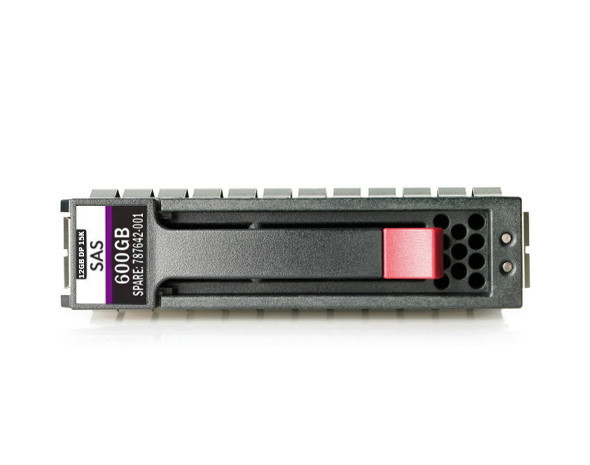
HPE J9F42A 600GB 15K RPM SAS 12Gb/s SFF Dual Port Enterprise Hard Drive for MSA 1040 & 2040 SAN Storage Systems
HPE J9F42A 600GB 15000RPM 2.5-Inch SFF Dual Port SAS-12Gbps Enterprise Hard Drive: The Complete Buyer's Guide
Enterprise storage administrators managing HPE Modular Smart Array (MSA) environments know that drive selection directly impacts application performance, uptime, and total cost of ownership. The HPE J9F42A 600GB 15000RPM 2.5-inch Small Form Factor Dual Port SAS-12Gbps Enterprise Hard Drive is purpose-built for HPE MSA 1040 and 2040 SAN storage systems, delivering the speed, redundancy, and reliability that mission-critical workloads demand. This guide breaks down everything IT professionals need to know before purchasing, deploying, or replacing this drive.
What Is the HPE J9F42A Hard Drive?
The J9F42A is HPE's option part number for a 600GB, 15,000 RPM, 2.5-inch small form factor (SFF) enterprise hard disk drive built on a 12Gb/s SAS (Serial Attached SCSI) interface. It is officially designated for use in HPE Modular Smart Array 1040 and 2040 SAN storage platforms, making it a go-to component for businesses expanding or maintaining their HPE MSA storage infrastructure.
Part Number Cross-Reference
Because HPE storage drives are frequently re-badged across firmware revisions and supply batches, the J9F42A is associated with several spare and assembly numbers, including:
- Spare Part Number: 787642-001
- Assembly Numbers: 748385-003, 875217-002, 759202-003, 867254-002, 744995-003
- Model Numbers: EH0600JDYTL, EH000600JWHPN, EH0600JEDHE, EH000600JWCPL, EH0600JDXBC
If you're sourcing a replacement drive and see any of these numbers listed instead of "J9F42A," it is typically the same physical drive or a direct HPE-validated equivalent.
Hot-Plug, Dual-Port Design
This drive uses a hot-plug, dual-port SAS architecture, meaning it can be inserted or removed from a live, running storage array without downtime, and it maintains two independent data paths to the controller for built-in failover protection.
Key Technical Specifications
Understanding the full spec sheet helps confirm compatibility and sets accurate performance expectations before deployment.
Capacity and Performance
- Capacity: 600GB
- Spindle Speed: 15,000 RPM
- Interface: SAS 12Gb/s (Serial Attached SCSI)
- External Data Transfer Rate: 1.2GB/s
- Average Seek Time: Approximately 2.72ms
- Track-to-Track Seek Time: Approximately 0.22ms
- Bytes per Sector: 512
Physical Design
- Form Factor: 2.5-inch Small Form Factor (SFF)
- Drive Type: Hot-Plug, Dual Port
- Carrier: Standard HPE drive carrier included
- Weight: Approximately 1.10 lbs (0.50 kg) including carrier
- Workload Category: Enterprise (built for continuous, high-duty-cycle operation)
These specifications position the J9F42A as a high-RPM, low-latency drive optimized for I/O-intensive tasks rather than bulk cold storage, where higher-capacity, lower-RPM drives would be more appropriate.
Compatibility: Where This Drive Fits
Compatibility is the single most important factor when purchasing replacement or expansion drives for enterprise SAN systems, since inserting an unsupported drive can trigger firmware warnings or degraded performance.
Supported HPE MSA Storage Systems
The J9F42A is validated for use in:
- HPE MSA 1040 SAN Storage
- HPE MSA 1040 Dual Controller SFF Bundle
- HPE MSA 2040 SAN Storage
- HPE MSA 2040 SAN Dual Controller SFF Bundle
- HPE MSA 2040 SAS Dual Controller SFF Bundle
Bay and Interface Requirements
The drive is designed to slot into standard 2.5-inch SFF drive bays and connects via a single SAS 12Gb/s port pair (dual-ported for redundancy). Before ordering, confirm that your MSA chassis and controller firmware support 12Gb/s SAS drives, as older MSA models or outdated firmware may only support 6Gb/s SAS.
Why 15K RPM and Dual-Port SAS Matter
Not every workload needs a 15,000 RPM drive, so it's worth understanding exactly what performance advantage this specification delivers.
Performance Benefits for I/O-Intensive Workloads
The 15,000 RPM spindle speed combined with the 12Gb/s SAS interface significantly reduces latency and increases input/output operations per second (IOPS) compared to 7.2K or 10K RPM alternatives. This makes the J9F42A well suited to:
- Online Transaction Processing (OLTP) databases
- Real-time analytics platforms
- Virtualized server environments (VMware, Hyper-V)
- Applications requiring consistently low read/write latency
Redundancy Through Dual-Port Architecture
The dual-port SAS design allows the drive to maintain two simultaneous, independent connections to the storage controller. If one data path fails, the second path keeps data accessible without interruption — a critical feature for organizations that cannot tolerate storage downtime.
Density and Efficiency Advantages
The 2.5-inch SFF footprint allows more drives to be packed into the same rack space compared to 3.5-inch large form factor (LFF) drives, while also consuming less power per drive. This translates into higher storage density and reduced cooling costs in the data center.
Typical Use Cases
Matching the drive to the right workload ensures you get the best return on investment.
Enterprise Database and OLTP Environments
High-transaction-volume databases benefit from the drive's fast seek times and high IOPS, reducing query latency and improving application responsiveness under heavy concurrent load.
Virtualization and Cloud Infrastructure
Virtualized environments generate highly randomized read/write patterns across many virtual machines. The J9F42A's performance characteristics help maintain consistent VM responsiveness even under mixed workloads.
SAN Expansion and Drive Replacement
Because the J9F42A is a factory-validated part for the MSA 1040/2040 platform, it is also commonly purchased simply to replace a failed or aging drive in an existing array, or to expand available SAN capacity without introducing unsupported hardware.
Installation and Handling Best Practices
Proper installation protects both the new drive and the existing array configuration.
Hot-Plug Installation Steps
- Verify the target drive bay and confirm the array has enough redundancy to tolerate the temporary rebuild process.
- Insert the drive into its carrier (if not pre-installed) and slide it into the appropriate bay until it clicks into place.
- Allow the MSA management software to detect the new drive and initiate any required RAID rebuild or pool assignment.
- Monitor the rebuild process through HPE Storage Management Utility or SMU (Storage Management Utility) to confirm successful integration.
Firmware and Compatibility Checks
Before installation, confirm your MSA controller firmware is current, since HPE periodically releases firmware updates that add or refine support for specific drive part numbers. Running outdated firmware is one of the most common causes of "unsupported drive" alerts even when the correct HPE part is used.
Questions to Ask Before You Buy
- Does the listing specify the exact spare or assembly number matching your MSA controller's supported drive list?
- Is the warranty period and return policy clearly stated?
- Does the seller guarantee compatibility with MSA 1040/2040 specifically, rather than generic MSA support?
Always cross-check compatibility against HPE's official QuickSpecs or the HPE Single Point of Connectivity Knowledge (SPOCK) tool before finalizing a purchase, especially when buying from third-party resellers.
Frequently Asked Questions
Is the HPE J9F42A hot-swappable?
Yes. It is designed as a hot-plug drive, allowing replacement or addition without powering down the storage array.
What is the difference between J9F42A and its spare part number 787642-001?
They refer to the same physical drive. J9F42A is the HPE option (ordering) part number, while 787642-001 is the corresponding HPE spare part number used for service and replacement orders.
Can this drive be used in HPE MSA models other than 1040/2040?
It is officially validated for the MSA 1040 and 2040 platforms. Using it in other MSA generations or unsupported systems is not recommended without confirming compatibility through HPE documentation, as controller firmware may not recognize the drive.
How does 15K RPM compare to 10K RPM drives for SAN storage?
15K RPM drives offer lower latency and higher IOPS, making them better suited to transactional and latency-sensitive workloads, while 10K RPM drives often provide a better balance of capacity and cost for less demanding workloads.
Final Thoughts
The HPE J9F42A 600GB 15000RPM 2.5-inch SFF Dual Port SAS-12Gbps Enterprise Hard Drive remains a solid, HPE-validated choice for organizations running MSA 1040 or 2040 SAN storage systems that need dependable, high-performance, hot-swappable storage. Its combination of high rotational speed, dual-port redundancy, and enterprise-grade reliability makes it particularly well suited to database, virtualization, and other I/O-intensive environments where downtime and latency are not acceptable trade-offs. Before purchasing, always confirm the exact part number, firmware compatibility, and warranty terms to ensure a smooth deployment.
Recent Posts
-
Reviving Legacy Server Performance: HPE 785071-B21 300GB 10K SAS Storage for ProLiant Servers
HPE 785071-B21 300GB 10K SAS Hard Drive: Enterprise Storage for ProLiant Gen1 Through Gen7 Servers T …Sep 29th 2026 -
Where Enterprise Speed Meets Dependability: HPE P40430-B21 300GB 10K SAS Storage for ProLiant Gen10 Plus Servers
HPE P40430-B21 300GB 10K SAS Hard Drive: Reliable Mission Critical Storage for ProLiant Gen10 Plus S …Sep 24th 2026 -
Built for the Critical Workload: HPE P28028-B21 300GB 15K SAS Drive for High-Performance ProLiant Servers
HPE P28028-B21 300GB 15K SAS Hard Drive: High-Speed Enterprise Storage for ProLiant Gen9 and Gen10 P …Sep 23rd 2026