
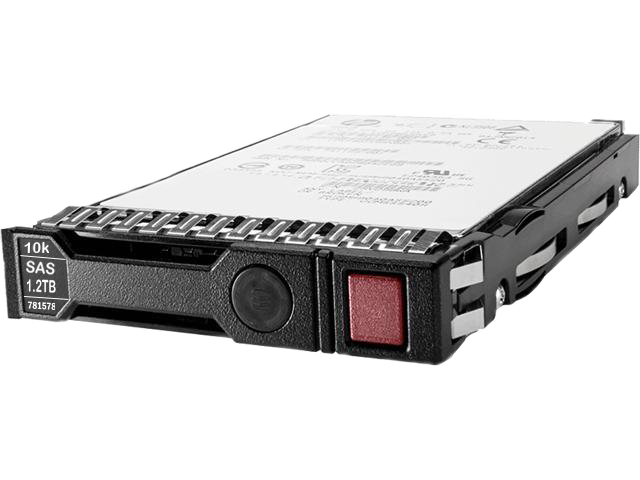
Fast, Redundant, and Absolutely Unbothered: The HPE 781518-B21 Deep Dive
HPE 781518-B21 1.2TB SAS Hard Drive: The Complete Guide for ProLiant Server Administrators
Meta Description: Everything you need to know about the HPE 781518-B21 1.2TB 10K RPM 2.5" SAS 12Gbps Smart Carrier enterprise hard drive — specs, compatibility, performance, installation tips, and real-world use cases for Gen8, Gen9, and Gen10 ProLiant servers.
If you've ever stared at a server rack at 2 AM, coffee in hand, wondering whether the storage drive you're about to install is actually the right one — this article is for you. The HPE 781518-B21 is one of those workhorses that quietly powers mission-critical infrastructure around the world, and it deserves a proper introduction. Let's dig in.
What Exactly Is the HPE 781518-B21?
At its core, the HPE 781518-B21 is a 1.2TB, 10,000 RPM, 2.5-inch Small Form Factor (SFF) enterprise hard drive built for serious server environments. It uses a Dual Port SAS-12Gbps interface and ships with HPE's Smart Carrier tray — making it a plug-and-play option for HPE ProLiant Gen8, Gen9, and Gen10 servers.
Think of it as the reliable workhorse of your data center: not flashy, not trying to win Instagram awards, but absolutely dependable when your business depends on it.
Key Specifications at a Glance
| Specification | Details |
|---|---|
| Part Number | 781518-B21 |
| Capacity | 1.2 TB |
| Form Factor | 2.5-inch Small Form Factor (SFF) |
| Interface | SAS 12Gbps (Dual Port) |
| Spindle Speed | 10,000 RPM |
| Carrier Type | Smart Carrier (SC) |
| Server Compatibility | HPE ProLiant Gen8, Gen9, Gen10 |
| Drive Type | Enterprise Hard Disk Drive (HDD) |
| Cache | 128 MB |
| Transfer Rate | Up to 12 Gbps |
Why the HPE 781518-B21 Stands Out in a Crowded Market
It's Not Just Any Drive — It's an HPE-Certified Drive
Here's something a lot of people overlook when they're trying to save a few bucks on third-party drives: HPE certifies its own drives specifically for ProLiant servers. The 781518-B21 isn't a generic drive slapped into an HPE tray. It's been engineered, tested, and validated to work seamlessly within HPE's ecosystem.
What does that mean in practice? It means your HPE iLO (Integrated Lights-Out) management interface can actually talk to this drive. You get real-time health monitoring, predictive failure alerts, and full integration with HPE Smart Storage Administrator (SSA). Try getting that level of visibility with a no-name aftermarket drive.
Dual Port SAS: Because Single Points of Failure Are So Last Decade
The "Dual Port" in SAS-12Gbps isn't just marketing fluff. Having two independent SAS ports means:
- Redundant data paths — if one path fails, data keeps flowing through the other
- Multipath I/O (MPIO) support — load-balance across both ports for better throughput
- Higher availability in mission-critical environments where downtime is measured in lost revenue, not inconvenience
For any organization running databases, virtualization stacks, or transactional workloads, that redundancy isn't optional — it's essential.
10,000 RPM: The Sweet Spot Between Speed and Endurance
There's an ongoing debate in storage circles between 10K and 15K RPM drives. The 10K RPM camp wins on a few important fronts:
- Lower heat generation — critical in dense server configurations
- Longer mechanical lifespan — less wear on bearings and platters over time
- Excellent IOPS for mixed workloads — not as fast as 15K, but more than fast enough for most enterprise applications
- Better cost-per-GB ratio — you get more capacity for your money compared to 15K drives
The HPE 781518-B21 at 10K RPM is genuinely the Goldilocks drive for most server environments — not too hot, not too slow, just right.
Understanding the Smart Carrier: More Than Just a Tray
What Is an HPE Smart Carrier?
If you've only ever worked with generic drive trays, the HPE Smart Carrier is going to feel like an upgrade. It's an intelligent hot-plug drive carrier that communicates with the server backplane, providing:
- LED activity and fault indicators — instantly see which drive needs attention without pulling everything out
- Drive activity monitoring — real-time read/write status
- Fault detection — the carrier itself can signal a drive problem before it becomes catastrophic
- Tool-less installation — no screwdrivers needed; the drive clicks into place
Hot-Plug Support: Your New Best Friend
The Smart Carrier's hot-plug capability means you can swap a failed drive while the server is still running. For businesses where downtime isn't an option — think hospitals, financial institutions, e-commerce platforms — this is not a nice-to-have feature. It's a survival mechanism.
Picture this: it's a Tuesday afternoon, your monitoring system pings you about a degraded RAID array, and instead of scheduling a 3 AM maintenance window, you simply slide in a replacement drive and let the array rebuild itself. That's the power of hot-plug in action.
HPE 781518-B21 Performance Deep Dive
Sequential vs. Random I/O: Where This Drive Shines
The 781518-B21 is optimized for enterprise mixed-use workloads — which is a fancy way of saying it handles both reads and writes gracefully without dramatically favoring one over the other.
Here's a rough performance profile:
- Sequential Read: Up to ~200 MB/s
- Sequential Write: Up to ~170 MB/s
- Random 4K IOPS (Read): ~170–200 IOPS per millisecond average latency
- Average Latency: ~4–5ms (typical for 10K spinning media)
Now, before you raise an eyebrow at those numbers compared to an NVMe SSD, remember: this is an enterprise HDD. It's not competing with SSDs on raw speed — it's competing on cost per terabyte, endurance, and capacity at price point. For archiving, warm data, tiered storage, or backup targets, the economics are simply unbeatable.
SAS 12Gbps Interface: Future-Ready Bandwidth
The SAS-12Gbps interface on this drive provides up to 12 gigabits per second of theoretical bandwidth per port — and remember, this drive has two ports. That's a 24Gbps aggregate bandwidth ceiling, which is more than enough headroom even as your storage demands grow.
SAS also has inherent advantages over SATA in enterprise settings:
- Full-duplex communication — read and write simultaneously without bandwidth contention
- Command queuing depth up to 256 (vs. 32 for SATA/AHCI) — critical for high-concurrency server workloads
- Longer cable runs and better signal integrity in dense environments
- Enterprise-grade error handling and reliability standards
Compatibility: Which Servers Does the HPE 781518-B21 Work With?
HPE ProLiant Gen8 Servers
The 781518-B21 is fully compatible with the Gen8 lineup, including:
- ProLiant DL360p Gen8
- ProLiant DL380p Gen8
- ProLiant DL560 Gen8
- ProLiant DL580 Gen8
- ProLiant ML350p Gen8
- ProLiant BL460c Gen8 (blade)
- ProLiant SL230s Gen8
HPE ProLiant Gen9 Servers
Gen9 compatibility includes virtually the entire product family:
- ProLiant DL160 Gen9
- ProLiant DL180 Gen9
- ProLiant DL360 Gen9
- ProLiant DL380 Gen9
- ProLiant DL560 Gen9
- ProLiant DL580 Gen9
- ProLiant ML110 Gen9
- ProLiant ML150 Gen9
- ProLiant ML350 Gen9
HPE ProLiant Gen10 Servers
The drive carries forward compatibility into the Gen10 family, including:
- ProLiant DL360 Gen10
- ProLiant DL380 Gen10
- ProLiant DL560 Gen10
- ProLiant DL580 Gen10
- ProLiant ML350 Gen10
Pro tip: Always verify compatibility using the HPE Single Point of Connectivity Knowledge (SPOCK) database before purchasing. Server generations can have nuanced backplane requirements.
Use Cases: Who Actually Needs This Drive?
Virtualization Hosts (VMware, Hyper-V, KVM)
Virtualization platforms are among the most I/O-intensive workloads in any data center. Virtual machines generate constant random I/O as multiple operating systems compete for storage resources simultaneously. The HPE 781518-B21, configured in a RAID 10 array, delivers the IOPS headroom and redundancy that VM hosts demand.
Many organizations use these drives in a tiered storage model:
- Tier 1: NVMe or SAS SSDs for hot data and VM boot volumes
- Tier 2: 10K SAS HDDs (like the 781518-B21) for warm VMs and active databases
- Tier 3: 7.2K SATA HDDs or tape for cold archives
Database Servers (SQL Server, Oracle, PostgreSQL)
Relational databases love drives that can handle high queue depths and consistent random I/O. Transaction logs, index lookups, and query result caching all create patterns that 10K SAS drives handle elegantly. For organizations that haven't yet migrated their entire database tier to all-flash, the 781518-B21 remains a cost-effective solution.
File and Print Servers
Not every workload needs NVMe speeds. Corporate file servers, print spoolers, and home directory storage benefit from the capacity-to-cost ratio of enterprise HDDs without the premium price of flash storage.
Backup and Recovery Infrastructure
When you're storing backup data that needs to be accessible (not archived to tape), 10K SAS drives strike an excellent balance. They're fast enough for rapid restores and capacious enough to store meaningful backup windows at reasonable cost.
Installation Guide: Getting the HPE 781518-B21 Up and Running
Step 1: Verify Your Server's Storage Backplane
Before you crack open the box, confirm your server has:
- An available 2.5-inch SFF SAS drive bay
- A compatible SAS controller (HPE Smart Array P-series or B-series controllers work great)
- The appropriate backplane firmware (update HPE SPP — Service Pack for ProLiant — before installation)
Step 2: Power Down or Leverage Hot-Plug
For initial installations or non-redundant configurations, power down the server. For hot-swap into an existing RAID array with a spare bay, the Smart Carrier handles live insertion gracefully.
Step 3: Install the Drive
- Open the drive bay by pressing the Smart Carrier latch
- Slide the 781518-B21 into the bay until it seats firmly
- Close the carrier latch — you'll feel and hear a satisfying click
- Observe the LED: a solid green light indicates power; activity flashing means the drive is being recognized
Step 4: Configure Storage with HPE SSA
Launch HPE Smart Storage Administrator from the iLO interface or during POST:
- Navigate to your Smart Array controller
- The new drive will appear as an Unassigned Drive
- Create a new logical drive or add it to an existing RAID array
- Configure your RAID level (RAID 1, 5, 6, or 10 depending on your fault tolerance requirements)
- Initialize the array and format the logical volume
Step 5: Monitor Drive Health
After installation, set up:
- HPE iLO alerts for predictive failure notifications
- Smart Array event logging for I/O errors or latency spikes
- HPE OneView integration if you're managing a multi-server environment
HPE Smart Carrier vs. Basic Carrier: Which Should You Choose?
The Difference Matters
HPE offers drives with two carrier types — Smart Carrier (SC) and Basic Carrier (BC). The 781518-B21 comes with the Smart Carrier, which is the better choice in almost every scenario.
| Feature | Smart Carrier (SC) | Basic Carrier (BC) |
|---|---|---|
| LED Indicators | Activity + Fault LEDs | Fault LED only |
| Hot-Plug Support | Yes | Yes |
| Drive Health Communication | Full backplane integration | Limited |
| Recommended For | Production servers | Entry-level/budget deployments |
| Cost | Slightly higher | Lower |
For any production workload where visibility and rapid fault identification matter, the Smart Carrier isn't an upgrade — it's the minimum viable option.
Common Questions About the HPE 781518-B21
Can I Use This Drive in Non-HPE Servers?
Technically, yes — SAS is a standard interface. However, the drive is firmware-optimized for HPE environments, and you'll lose Smart Carrier integration, iLO monitoring, and SSA management. For non-HPE servers, you'd typically purchase a generic OEM SAS drive rather than an HPE-branded unit.
Is This Drive Compatible with HPE's SSD Cache (SmartCache)?
Absolutely. The 781518-B21 works seamlessly with HPE SmartCache when paired with an SSD on a supported Smart Array controller. SmartCache uses the SSD as a read cache, dramatically improving random read performance for frequently accessed data — giving you somewhat SSD-like performance at HDD-like cost.
What RAID Levels Are Supported?
With an HPE Smart Array controller, the 781518-B21 supports:
- RAID 0 — Striping (performance, no redundancy)
- RAID 1 — Mirroring (full redundancy, 50% capacity)
- RAID 5 — Distributed parity (balance of performance and redundancy)
- RAID 6 — Dual parity (highest redundancy, two simultaneous drive failures tolerated)
- RAID 10 — Striped mirrors (best performance + redundancy)
- RAID 50 / 60 — For larger arrays
How Long Does This Drive Last?
HPE enterprise drives are rated for 24/7 operation with a 1.2 million hour MTBF (Mean Time Between Failures). Realistically, in a well-cooled server environment, you can expect 5–7 years of reliable service. HPE's predictive failure monitoring via SMART data gives you plenty of warning before a drive actually fails.
HPE 781518-B21 vs. The Competition
How Does It Stack Up?
| Drive | Capacity | RPM | Interface | Form Factor | Best For |
|---|---|---|---|---|---|
| HPE 781518-B21 | 1.2TB | 10K | SAS 12G | 2.5" SFF | HPE ProLiant mixed workloads |
| Seagate Exos 10E2400 | 2.4TB | 10K | SAS 12G | 2.5" SFF | High-density storage |
| WD Ultrastar C10K900 | 900GB | 10K | SAS 6G | 2.5" SFF | Legacy environments |
| HPE 765424-B21 | 600GB | 10K | SAS 12G | 2.5" SFF | Budget HPE deployments |
| HPE 785069-B21 (SSD) | 800GB | N/A | SAS 12G | 2.5" SFF | All-flash tier 1 |
The 781518-B21 wins where deep HPE ecosystem integration, cost-efficiency, and workload flexibility intersect.
Final Thoughts: Is the HPE 781518-B21 Right for Your Environment?
After everything we've covered, the answer for most HPE ProLiant shop administrators is a confident yes — with a few nuances.
You should choose the HPE 781518-B21 if:
- You're running HPE ProLiant Gen8, Gen9, or Gen10 servers and want native ecosystem integration
- Your workloads involve databases, virtualization, or mixed I/O patterns
- You value redundancy, predictive monitoring, and hot-plug capability
- You're building a tiered storage strategy and need a reliable warm-data tier
You might look elsewhere if:
- You need maximum IOPS and latency is critical — in that case, look at HPE SAS or NVMe SSDs
- You need raw capacity at minimum cost — large-capacity SATA drives might serve better for pure archival
- Your server isn't HPE-branded — the ecosystem benefits disappear outside HPE ProLiant platforms
The HPE 781518-B21 isn't the sexiest piece of hardware in your data center. It doesn't blink with RGB LEDs or come with a dramatic product launch video. What it does do is show up, spin reliably, protect your data, and integrate beautifully into the HPE management ecosystem you've already invested in.
And honestly? In enterprise IT, that's worth more than hype.
Quick Reference Summary
- Part Number: HPE 781518-B21
- Capacity: 1.2TB
- Speed: 10,000 RPM
- Interface: Dual Port SAS 12Gbps
- Form Factor: 2.5-inch Small Form Factor (SFF)
- Carrier: Smart Carrier (Hot-Plug)
- Cache: 128MB
- Compatible With: HPE ProLiant Gen8, Gen9, Gen10 servers
- Best Use Cases: Virtualization, databases, mixed enterprise workloads, tiered storage
- MTBF: ~1.2 million hours
- Operation: 24/7 enterprise-grade
Looking to expand your HPE storage environment? Pair the 781518-B21 with an HPE Smart Array P840 controller and HPE SmartCache SSD for a high-performance, cost-efficient hybrid storage solution that punches well above its price class.
Recent Posts
-
HPE 737390-B21: Unleashing Enterprise-Class Speed and Reliability with a 300GB 15K SAS Hard Drive
In the demanding world of enterprise computing, storage performance plays a vital role in keeping ap …Oct 14th 2026 -
HPE 516814-B21: The 15K SAS Storage Workhorse for Legacy ProLiant Servers
HPE 516814-B21: Reviving Enterprise Performance with 300GB of 15K SAS Storage Power Introduction: De …Oct 13th 2026 -
HPE 516824-B21: Unleashing Enterprise Storage Performance with 300GB 15K RPM SAS Technology
Introduction: Reliable Storage for Demanding Enterprise Environments In today's data-driven business …Oct 12th 2026