
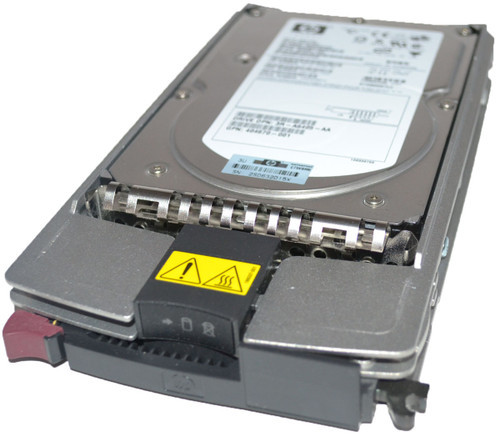
Boost Enterprise Storage Performance with the HPE AJ872A 600GB 15K RPM Fibre Channel Hot-Swap Hard Drive
Still Running an HPE EVA Array? Here's What You Need to Know About the AJ872A 600GB 15K Hard Drive
Enterprise storage administrators managing HPE StorageWorks Enterprise Virtual Array (EVA) systems know that drive reliability and compatibility are non-negotiable. The HPE AJ872A is a purpose-built 600GB, 15,000 RPM, dual-port Fibre Channel hard drive engineered specifically for HPE's M6412A enclosures and the EVA 4400, 6400, and 8400 storage arrays. This guide covers everything IT professionals, data center managers, and storage engineers need to know before purchasing, installing, or replacing this drive.
What Is the HPE AJ872A Hard Drive?
The HPE AJ872A is an enterprise-grade, hot-swappable hard disk drive designed for high-availability SAN environments. It combines a 600GB storage capacity with a 15,000 RPM spindle speed, delivering the low-latency, high-IOPS performance that transactional databases, virtualization hosts, and mission-critical applications demand.
Unlike consumer or nearline drives, the AJ872A is built around dual-port Fibre Channel Arbitrated Loop (FC-AL) architecture, allowing it to maintain data availability even if one path in the storage fabric fails. This makes it a core component for organizations that cannot tolerate storage downtime.
Key Identifiers and Equivalent Part Numbers
The AJ872A shares its hardware platform with several other HPE and OEM part numbers, which is useful to know when sourcing replacements or verifying compatibility:
- AJ872A / AJ872B (option part numbers)
- 495808-001 (spare part number)
- BF600DAJZT / BF600DASTL (model numbers)
- 495277-006 / 531294-003 (assembly numbers)
<cite index="1-1">These part numbers all correspond to the same underlying drive: a 600GB, 15,000 RPM, dual-port, 2.5-inch small form factor Fibre Channel-AL hot-swap hard drive built for HPE StorageWorks M6412A enclosures and the EVA 4400, 6400, and 8400 arrays.</cite> If you see any of these numbers on a quote or in a compatibility list, you're looking at the same physical drive family.
HPE AJ872A Technical Specifications
Understanding the full spec sheet helps you confirm compatibility before purchase and set accurate performance expectations for your storage environment.
Capacity and Performance Specifications
<cite index="1-1">The drive offers a storage capacity of 600GB and a spindle speed of 15,000 RPM</cite>, placing it firmly in the high-performance tier of enterprise Fibre Channel storage. <cite index="1-1">Its external data transfer rate runs at 2/4 Gbps</cite>, meaning it can negotiate the optimal link speed depending on the Fibre Channel switch or controller it connects to.
- Capacity: 600 GB
- Spindle Speed: 15,000 RPM
- External Data Transfer Rate: 2/4 Gbps
- Device Type: Hard Drive – Hot-Swap
Interface and Connectivity Details
<cite index="1-1">The AJ872A uses a 2/4 Gbps Fibre Channel-AL interface with dual-port form factor features</cite>, which is central to its role in redundant SAN architectures. Dual-port connectivity means the drive can be accessed through two independent data paths, so a single cable, port, or loop failure doesn't take the drive offline.
- Interface: 2/4 Gbps Fibre Channel – Arbitrated Loop (FC-AL)
- Port Configuration: Dual Port
- Interfaces Count: <cite index="1-1">1 x 2/4 Gbps FC-AL</cite>
Physical Dimensions and Form Factor
<cite index="1-1">The drive is built in a 2.5-inch small form factor (SFF) and is compatible with SFF drive bays</cite>. <cite index="1-1">Its physical dimensions are 4.30 inches wide, 7.40 inches deep, and 1.10 inches tall, with a total weight of 21.9 ounces</cite>, including the drive carrier/tray used for hot-swap insertion.
- Form Factor: 2.5-inch Small Form Factor (SFF)
- Width: 4.30 inches
- Depth: 7.40 inches
- Height: 1.10 inches
- Weight: 21.9 oz
Compatible Systems and Enclosures
Compatibility is the single most important factor when sourcing enterprise storage drives, since Fibre Channel drives are firmware-matched to specific array controllers and backplanes.
Supported StorageWorks Enclosures
The AJ872A is designed to slot directly into HPE StorageWorks M6412A drive enclosures, which serve as the disk shelves connected to EVA controller pairs. The M6412A enclosure supports 2.5-inch SFF dual-port Fibre Channel drives exclusively, so mixing form factors or single-port drives is not supported.
Supported EVA Storage Arrays
<cite index="1-1">This hard drive is qualified for use with the HPE StorageWorks Enterprise Virtual Array 4400, Enterprise Virtual Array 6400, and Enterprise Virtual Array 8400</cite>. These arrays were widely deployed in mid-size to large enterprise data centers for consolidated block storage, VMware datastores, and database workloads throughout their product lifecycle.
If you're maintaining a legacy EVA array today, confirming your array's exact model and controller firmware version against HPE's documented compatibility list is strongly recommended before ordering.
Why Choose the AJ872A for Your SAN Environment
For organizations still running EVA 4400/6400/8400 arrays, drive selection isn't just about capacity — it's about maintaining the redundancy and performance characteristics the array was originally engineered around.
High-Performance 15K RPM Design
15,000 RPM drives remain relevant for workloads sensitive to latency and random I/O performance, such as OLTP databases, email systems, and virtual machine datastores. Compared to 10K RPM or nearline SAS/SATA alternatives, the AJ872A delivers noticeably faster seek times and higher sustained IOPS, which matters when an EVA array is servicing many concurrent read/write requests.
Dual-Port Redundancy for High Availability
Because <cite index="1-1">the AJ872A features a dual-port design</cite>, it integrates with the EVA's active-active controller architecture. If one Fibre Channel loop or controller path experiences an issue, the array can continue servicing I/O through the second path without data loss or service interruption — a critical feature for production environments with strict uptime SLAs.
Hot-Swap Capability for Reduced Downtime
<cite index="1-1">As a hot-swap hard drive</cite>, the AJ872A can be inserted or removed from a live M6412A enclosure without powering down the array or disrupting host access to other drives in the group. This is essential for maintenance windows, drive replacements after a predictive failure alert, or capacity expansions performed during business hours.
Common Use Cases
Replacing a Failed Drive in an Existing EVA Array
The most frequent reason IT teams purchase the AJ872A is to replace a failed or failing drive flagged by HPE Command View EVA or a predictive failure alert. Because EVA arrays use disk groups with distributed parity, replacing a failed drive promptly with a like-for-like part is important to avoid extended periods of degraded redundancy.
Expanding Storage Capacity in M6412A Enclosures
Organizations looking to add capacity to an existing disk group can add additional AJ872A drives to available bays in the M6412A enclosure, provided the enclosure has open slots and the array's licensed capacity allows for the expansion.
Supporting Legacy Infrastructure and Extended Hardware Life
Many enterprises continue running EVA arrays well past their official end-of-service-life dates due to budget cycles, application dependencies, or ongoing migration projects. Sourcing genuine or certified-compatible AJ872A drives allows these teams to keep legacy arrays healthy and fully redundant until a planned migration to newer storage platforms is complete.
Installation and Handling Best Practices
Pre-Installation Checklist
Before installing an AJ872A drive, verify the target bay is empty or contains the failed drive you intend to replace, confirm your EVA controller firmware is up to date, and make sure you have a current backup or snapshot of critical data as a precaution during any hardware maintenance activity.
Proper Hot-Swap Procedure
Follow HPE's documented hot-swap procedure: release the drive carrier latch, allow any in-progress I/O to the target bay to settle, and insert the replacement drive firmly until it seats and locks into the backplane connector. The array should automatically detect the new drive and begin any required rebuild or reconstruction process.
Post-Installation Verification
After installation, use HPE Command View EVA (or the equivalent management tool for your array generation) to confirm the drive is recognized, shows a healthy status, and that any disk group rebuild completes successfully before considering the maintenance task finished.
Frequently Asked Questions
Is the AJ872A compatible with EVA 4000, 6000, or 8000 series arrays?
The AJ872A is specifically qualified for EVA 4400, 6400, and 8400 arrays and M6412A enclosures. Earlier EVA 4000/6000/8000 series arrays typically use different enclosures (such as the M5314C) and drive part numbers, so always verify against HPE's official compatibility matrix before purchasing.
Can I mix AJ872A drives with other capacities in the same disk group?
HPE generally recommends using drives of matching capacity and speed within the same disk group to maintain predictable performance and avoid wasted capacity, since EVA disk groups are typically provisioned based on the smallest drive in the group.
What is the difference between AJ872A and AJ872B?
<cite index="1-1">Both AJ872A and AJ872B share the same core specifications: 600GB capacity, 15,000 RPM spindle speed, 2.5-inch SFF form factor, and dual-port 2/4 Gbps Fibre Channel-AL interface</cite>. The differing suffix generally reflects firmware revision or manufacturing batch rather than a functional difference, though it's good practice to confirm firmware compatibility with your specific array controller version.
Where can I find a genuine or certified-compatible AJ872A drive?
Because EVA arrays are legacy platforms, new-old-stock and certified-refurbished drives are the primary sourcing channels. Look for suppliers who test drives against actual EVA/M6412A hardware and offer a warranty period, since this significantly reduces the risk of receiving a drive with hidden defects or incompatible firmware.
Final Thoughts
The HPE AJ872A remains a critical replacement and expansion part for organizations still operating EVA 4400, 6400, or 8400 storage arrays with M6412A enclosures. Its 600GB capacity, 15,000 RPM performance tier, and dual-port Fibre Channel-AL interface make it a direct, reliable match for these legacy but still widely deployed enterprise storage platforms. Whether you're replacing a failed drive, expanding a disk group, or maintaining infrastructure ahead of a planned migration, confirming exact part number compatibility — AJ872A, AJ872B, 495808-001, BF600DAJZT, BF600DASTL, 495277-006, or 531294-003 — will ensure a smooth, downtime-free installation.
Recent Posts
-
Where Smart Storage Meets 10K Speed: Unlocking the Power of HPE 728712-B21 Enterprise SAS
HPE 728712-B21 300GB 10K SAS Hard Drive: Smart Storage Performance for ProLiant Gen8 and Gen9 Server …Oct 5th 2026 -
Where Legacy Meets Performance: Unleashing the HPE 574879-B21 300GB 10K SAS Enterprise Drive
HPE 574879-B21 300GB 10K SAS Hard Drive: Dependable Enterprise Storage for Legacy ProLiant Servers E …Oct 4th 2026 -
HPE 696736-B21: The 10K SAS Storage Engine Built for ProLiant Performance
HPE 696736-B21 300GB 10000RPM SAS-6Gbps Smart Carrier Enterprise Hard Drive for ProLiant Servers The …Oct 3rd 2026