
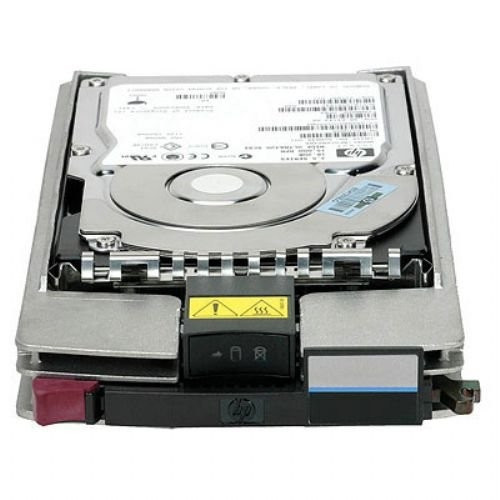
Keeping Legacy EVA Arrays Alive: A Complete Guide to the HPE AJ872B Hard Drive
HPE AJ872B 600GB 15000RPM Fibre Channel Hard Drive: The Complete Buyer's Guide
If you manage a legacy HPE StorageWorks environment, sooner or later you'll come face-to-face with a failed drive light on your EVA array or M6412A enclosure. When that happens, the part you need is almost always the HPE AJ872B 600GB 15000RPM 2.5-inch Small Form Factor Dual Port 2/4Gbps Fibre Channel-AL Hot-Swap Hard Drive. This guide covers everything you need to know — specifications, compatibility, installation, and buying advice — before you order a replacement.
What Is the HPE AJ872B Hard Drive?
The AJ872B is a genuine HPE enterprise-class hard disk drive built specifically for HPE's StorageWorks Enterprise Virtual Array (EVA) family. It is a 600GB, 15,000 RPM, 2.5-inch small form factor (SFF) drive that uses a dual-port 2/4Gbps Fibre Channel Arbitrated Loop (FC-AL) interface rather than the SAS or SATA interfaces found in most modern servers. It's designed as a hot-swappable component, meaning it can be pulled and replaced without powering down the storage array or interrupting production workloads.
This drive is also sold under several equivalent HPE part numbers, since HPE frequently re-badges the same physical drive across manufacturing runs. Functionally identical parts include:
- AJ872A
- BF600DAJZT
- BF600DASTL
- 495808-001 (spare part number)
- 495277-006 and 531294-003 (assembly numbers)
If your array's diagnostic tool references any of these numbers, the AJ872B is the correct replacement drive.
Key Technical Specifications
| Specification | Detail |
|---|---|
| Capacity | 600GB |
| Spindle Speed | 15,000 RPM |
| Form Factor | 2.5-inch Small Form Factor (SFF) |
| Interface | 2/4Gbps Fibre Channel-AL (Dual Port) |
| Data Transfer Rate | 2/4 Gbps |
| Ports | 1 x 2/4Gbps FC-AL, dual-port design |
| Hot-Swap Support | Yes |
| Dimensions | 4.30 in (W) x 7.40 in (D) x 1.10 in (H) |
| Weight | Approximately 21.9 oz |
The 15,000 RPM spindle speed places this drive firmly in the high-performance tier of spinning storage, delivering low latency and strong random I/O performance for the transaction-heavy workloads typical of EVA-based SANs.
Compatible HPE Systems and Enclosures
The AJ872B was purpose-built for HPE's mid-range Fibre Channel SAN platforms. Before ordering, confirm your hardware matches the supported list below.
Supported Enclosures
- HPE StorageWorks M6412A disk enclosures
Supported Storage Arrays
- HPE StorageWorks Enterprise Virtual Array (EVA) 4400
- HPE StorageWorks Enterprise Virtual Array (EVA) 6400
- HPE StorageWorks Enterprise Virtual Array (EVA) 8400
It's worth noting that the 2.5-inch AJ872B is specific to the EVA 4400/6400/8400 generation and the M6412A shelf. If you're running an older EVA 4000/6000/8000 or EVA 4100/6100/8100 array with 3.5-inch bays, you'll need the equivalent large form factor part (commonly AP751A/AP751B) instead — the AJ872B will not physically fit those enclosures.
Why the Fibre Channel-AL Interface Still Matters
Many storage administrators ask why HPE's older EVA arrays use Fibre Channel-AL rather than the SAS interfaces common in newer systems. The answer comes down to architecture: EVA storage controllers were engineered around a Fibre Channel Arbitrated Loop backend, and every drive on that loop — including the AJ872B — must speak native FC-AL to be recognized by the array's controller firmware.
Dual-Port Redundancy
The dual-port design is central to EVA reliability. Each drive connects to two independent loop paths, so if one path, cable, or controller fails, the array can continue reading and writing data through the redundant path. This redundancy is a core reason EVA arrays remained popular in mission-critical environments for so long.
Why You Can't Substitute a SAS or SATA Drive
Because the EVA controller communicates over FC-AL protocol, a SAS or SATA drive — even one with matching capacity and RPM — cannot be inserted in place of the AJ872B. The physical connector, protocol, and firmware handshake are all different. Using a genuine, correctly-numbered Fibre Channel drive is the only reliable path to compatibility.
Common Use Cases for the AJ872B
Replacing a Failed Drive in a Production EVA Array
The most frequent use case is a straightforward break-fix replacement. When an EVA's management software (such as HPE Command View EVA or SSSU) flags a failed physical disk, administrators source an AJ872B to restore full redundancy to the disk group as quickly as possible.
Building or Expanding Hot-Spare Inventory
Because EVA arrays are frequently kept in production well past their official end-of-service-life date, many IT teams stock several AJ872B drives as cold spares. Having pre-tested spares on the shelf minimizes downtime risk and avoids the lead times often associated with sourcing legacy Fibre Channel parts.
Capacity Expansion in M6412A Enclosures
Where an EVA disk group has available bays, additional AJ872B drives can be added to expand usable capacity or improve I/O performance by increasing the number of spindles participating in the disk group.
Lab, Test, and Legacy Support Environments
Managed service providers, data recovery specialists, and organizations supporting legacy customer environments often keep AJ872B stock on hand specifically to support EVA systems that are still active but no longer covered by standard HPE support contracts.
Installing the AJ872B: What to Expect
Hot-Swap Replacement Procedure
Because the AJ872B is a hot-swappable component, replacement does not require powering down the M6412A enclosure or the associated EVA controller. In general terms, the process involves:
- Identifying the failed drive bay via the array's management software or the enclosure's fault LED.
- Releasing the drive carrier latch and withdrawing the failed drive.
- Inserting the replacement AJ872B drive fully into the bay until the carrier latch engages.
- Allowing the array to automatically detect the new drive and begin any required rebuild or reconstruction process.
Post-Installation Verification
After insertion, confirm the drive is recognized correctly through your array management console, check that its status shows as healthy, and monitor the disk group rebuild until it completes. Always verify firmware compatibility between the new drive and your existing EVA controller software revision before considering the replacement finished.
Buying Considerations: New, Refurbished, and Grade A Drives
Since the AJ872B has been out of first-line HPE production for years, most units available today are sourced from the refurbished and secondary hardware market. When evaluating a listing, keep the following in mind.
Warranty Coverage
Reputable sellers typically offer anywhere from 30 to 90 days of warranty coverage on refurbished AJ872B drives. For production environments, prioritize suppliers offering advance replacement or extended warranty options, since legacy Fibre Channel drives can be harder to source quickly if a second failure occurs.
Grading and Testing
Look for drives explicitly labeled "Grade A" or equivalent, indicating the unit has been tested and shows no functional defects. Ask suppliers whether drives are burn-in tested and whether SMART or equivalent diagnostic data is available prior to shipment.
Genuine HPE Part Verification
Confirm the drive carries authentic HPE firmware and reports the correct model information (AJ872B, BF600DAJZT, or BF600DASTL) to your array's management software. Counterfeit or relabeled drives can cause compatibility failures or premature disk faults within an EVA disk group.
Frequently Asked Questions
Is the AJ872B the same drive as the AJ872A?
Yes. AJ872A and AJ872B are option part numbers referring to the same physical 600GB, 15,000 RPM, dual-port Fibre Channel drive; the differing suffix generally reflects packaging or revision changes rather than a functional difference.
Can I use the AJ872B in an EVA 4000, 6000, or 8000 array?
No. Those earlier-generation EVA arrays use 3.5-inch large form factor drives. The AJ872B's 2.5-inch small form factor is only compatible with the EVA 4400/6400/8400 series and M6412A enclosures.
What capacity and speed options does this drive support?
The AJ872B is fixed at 600GB capacity and a 15,000 RPM spindle speed with a 2/4Gbps Fibre Channel-AL interface. HPE offered other capacities and RPM tiers for the same enclosure family under different part numbers, so confirm your exact capacity requirement before ordering.
Does the AJ872B support hot-swapping?
Yes. The drive is designed for hot-swap replacement, allowing it to be installed or removed from a live M6412A enclosure without shutting down the array.
Final Thoughts
The HPE AJ872B remains one of the most commonly requested replacement parts for organizations still operating EVA 4400, 6400, or 8400 storage arrays with M6412A enclosures. Its 600GB capacity, 15,000 RPM performance, and dual-port Fibre Channel-AL interface make it a direct, drop-in match for the original factory configuration — provided you source a genuine, properly tested unit from a reliable supplier. Keeping at least one verified spare on hand is a smart precaution for any team still relying on this generation of HPE storage hardware.
Recent Posts
-
Where Smart Storage Meets 10K Speed: Unlocking the Power of HPE 728712-B21 Enterprise SAS
HPE 728712-B21 300GB 10K SAS Hard Drive: Smart Storage Performance for ProLiant Gen8 and Gen9 Server …Oct 5th 2026 -
Where Legacy Meets Performance: Unleashing the HPE 574879-B21 300GB 10K SAS Enterprise Drive
HPE 574879-B21 300GB 10K SAS Hard Drive: Dependable Enterprise Storage for Legacy ProLiant Servers E …Oct 4th 2026 -
HPE 696736-B21: The 10K SAS Storage Engine Built for ProLiant Performance
HPE 696736-B21 300GB 10000RPM SAS-6Gbps Smart Carrier Enterprise Hard Drive for ProLiant Servers The …Oct 3rd 2026