
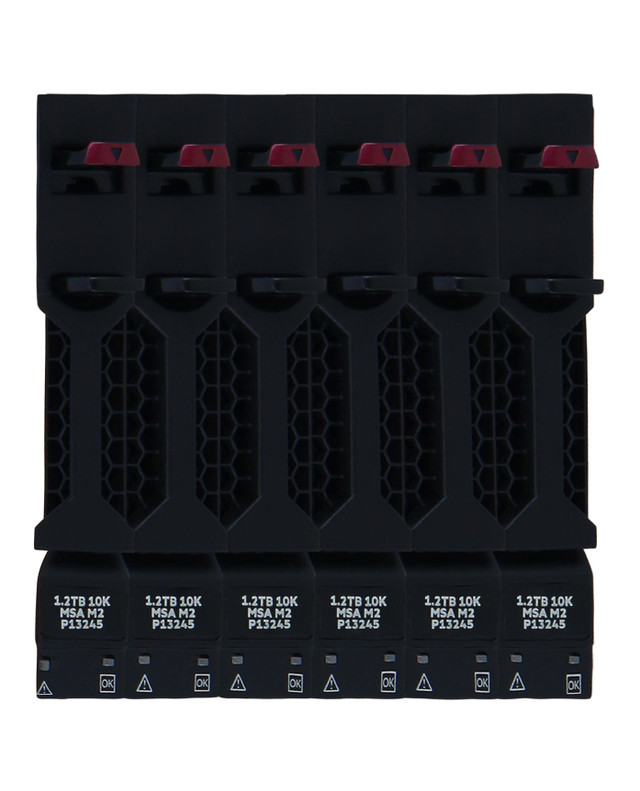
The Bundle That Means Business: HPE R0Q65A 7.2TB SAS-12Gbps and the Case for Doing More with Six
HPE R0Q65A 7.2TB (1.2TB x6) 10K RPM 2.5-Inch SFF 6-Pack SAS-12Gbps Enterprise Hard Drive Bundle: The Complete Guide
What Is the HPE R0Q65A and Why Does It Matter for Enterprise Storage?
If you manage storage infrastructure for a growing business, you already know the pressure of balancing performance, reliability, and cost. The HPE R0Q65A is a purpose-built answer to that exact challenge. It is a 7.2TB enterprise hard drive bundle that ships six HPE 1.2TB 10K RPM SAS-12Gbps 2.5-inch Small Form Factor (SFF) drives together in a single, convenient package — each individual drive carrying the part number R0Q55A.
Rather than sourcing drives one by one, HPE designed this 6-pack bundle specifically for organizations deploying or expanding their Modular Smart Array (MSA) 1060 or MSA 2060 storage systems. It simplifies procurement, keeps your storage environment consistent, and ensures every drive in the array comes from a single, validated platform. For IT teams dealing with procurement headaches, compatibility concerns, and vendor certifications, that kind of simplicity carries genuine value.
This article walks you through every important aspect of the HPE R0Q65A bundle — from its technical specifications and compatibility to real-world performance expectations and deployment best practices — so you can make an informed purchasing decision.
Understanding the Technical Specifications of HPE R0Q65A
Drive Capacity and Bundle Structure
The HPE R0Q65A delivers a total raw capacity of 7.2TB by combining six individual HPE R0Q55A 1.2TB drives. Each drive in the bundle is identical — same firmware, same performance profile, same enterprise-grade validation — which makes capacity planning and RAID configuration far more straightforward than mixing drive generations or vendors.
The 1.2TB per drive capacity sits in a practical sweet spot for enterprise SAS deployments. It offers enough density to build meaningful storage pools without the overhead cost of larger capacity drives that may exceed your immediate workload requirements. For mid-range arrays like the MSA 1060 and MSA 2060, this density aligns well with typical use cases in virtualization, database hosting, and business application storage.
Spindle Speed and Interface: What 10K RPM on SAS-12Gbps Means
The 10,000 RPM spindle speed is the defining performance characteristic of this drive. Compared to 7,200 RPM SATA drives, 10K RPM SAS drives deliver noticeably lower latency and higher IOPS — the kind of responsiveness that matters when multiple virtual machines or database instances are competing for I/O simultaneously.
The SAS-12Gbps interface doubles the bandwidth available on older SAS-6Gbps drives, providing a theoretical maximum throughput of 12 gigabits per second per lane. In practical terms, this means the drive controller is never the bottleneck for most enterprise workloads. The interface is also backward-compatible with SAS-6Gbps backplanes, though you would only see full 12Gbps throughput when connected to a compatible controller.
SAS as an interface also brings dual-port connectivity, which enables multipath I/O configurations. This matters for high-availability deployments where path redundancy protects against a single cable or port failure bringing down storage access.
Form Factor: 2.5-Inch SFF Explained
The 2.5-inch Small Form Factor (SFF) designation means these drives are physically compact, designed to slot into dense server and storage enclosures where space is at a premium. The MSA 1060 and MSA 2060 are built around this form factor, allowing them to pack significantly more drives into a 2U chassis compared to 3.5-inch Large Form Factor alternatives.
For data centers managing rack space carefully — and most do — the SFF advantage compounds over time. More drives per unit of rack space translates directly to higher storage density per kilowatt of power and per square foot of floor space.
HPE MSA 1060 and MSA 2060 Compatibility Deep Dive
Why These Drives Are Validated for MSA Arrays
HPE validates drives like the R0Q55A specifically for use in their Modular Smart Array platforms. This is not merely a marketing exercise. Validated drives go through firmware testing with the MSA controller, endurance profiling under representative workloads, and interoperability verification with the array's management software. When you deploy HPE-validated drives, you get the benefit of that testing work without having to do it yourself.
Using non-validated or off-brand drives in an MSA array can lead to subtle compatibility issues — drives that pass initial diagnostics but behave unexpectedly under sustained load, firmware mismatches that cause management software to report inaccurate health data, or support complications when troubleshooting a production issue.
MSA 1060 Use Cases and Fit
The HPE MSA 1060 is HPE's entry-level dual-controller array, designed for small and mid-sized businesses that need enterprise-class reliability without enterprise-class pricing. Typical deployments include file and print services, small database environments, virtual desktop infrastructure (VDI) for smaller teams, and general-purpose server virtualization.
For MSA 1060 environments, the R0Q65A bundle provides a cost-effective way to populate drive bays with consistent, high-performance SAS drives. Because the MSA 1060 supports both SAS and SSD tiers, many organizations deploy a bundle of these drives alongside a smaller set of SSDs to create tiered storage pools — frequently accessed data migrates to flash, while less active data resides on the SAS tier.
MSA 2060 Use Cases and Fit
The MSA 2060 steps up in scale and performance compared to the 1060. It is aimed at mid-market organizations and departmental deployments where higher drive counts, more throughput, and greater scalability matter. The MSA 2060 supports more enclosures, more drives, and higher aggregate bandwidth than its smaller sibling.
In MSA 2060 environments, the R0Q65A 6-pack bundle serves well as either the primary capacity tier or as part of a larger multi-tier storage pool. Organizations running SQL Server, Oracle, SAP, or similar database workloads often deploy multiple bundles across MSA 2060 enclosures to build out large RAID 6 or RAID 10 pools that balance capacity with redundancy.
Performance Expectations in Real-World Deployments
IOPS and Latency Profile of 10K SAS Drives
Under random read workloads, enterprise 10K SAS drives typically deliver in the range of 160 to 200 IOPS per drive, depending on I/O size. For sequential workloads — large block reads and writes like backup, replication, or video streaming — throughput can reach 200MB/s or beyond per drive.
Across six drives in a RAID configuration, these numbers aggregate meaningfully. A RAID 10 set of six R0Q55A drives provides three mirror pairs with combined read IOPS that can sustain several hundred operations per second — perfectly adequate for a mixed virtualization or small database workload.
It is worth being realistic here: if your environment is dominated by high-frequency, low-latency transactional workloads, all-flash arrays will outperform 10K SAS drives significantly. The R0Q65A bundle is a strong choice when you need the balance of reasonable IOPS, high sequential throughput, and per-gigabyte cost efficiency rather than maximum IOPS density.
Thermal and Power Behavior
Enterprise 2.5-inch SAS drives run warmer than their SATA counterparts due to the higher spindle speed and interface activity. The HPE MSA enclosures are designed with airflow patterns and thermal sensors calibrated for these drives, which is another reason staying within HPE's validated drive ecosystem pays off. Mixing drives with different thermal profiles can lead to hot spots in the enclosure that stress components over time.
Power consumption per drive is typically in the 4 to 7 watt range during active operation, which means six drives together draw roughly 25 to 42 watts under load — a modest addition to overall rack power budgets.
RAID Configuration Recommendations for the 6-Drive Bundle
RAID 10 for Performance-Sensitive Workloads
With exactly six drives, RAID 10 (striped mirrors) is a natural first choice for workloads where both performance and redundancy matter. RAID 10 across six drives creates three mirror pairs and stripes data across them, delivering excellent read performance and strong write performance. It tolerates the failure of one drive per mirror pair — potentially multiple simultaneous failures if they fall in different pairs.
The tradeoff is usable capacity: RAID 10 on six 1.2TB drives yields 3.6TB of usable space. That is 50% overhead for redundancy, which is a significant cost. For workloads where downtime is expensive, that overhead is a worthwhile investment.
RAID 6 for Capacity-Sensitive Deployments
RAID 6 distributes dual parity across the drive set, allowing any two drives to fail simultaneously without data loss. On six drives with 1.2TB each, RAID 6 yields approximately 4.8TB of usable space — better capacity efficiency than RAID 10, at the cost of somewhat lower write performance due to parity calculation overhead.
RAID 6 is a strong choice for backup targets, archive storage, and workloads with a sequential or mixed access pattern where the write overhead of parity is less noticeable.
RAID 5 Considerations
RAID 5 across six drives yields around 6TB of usable space, making it the most capacity-efficient option. However, RAID 5 tolerates only a single drive failure, and the rebuild time on a failed 1.2TB drive creates a window of vulnerability. For most production workloads, RAID 6 or RAID 10 is a safer choice unless storage budget constraints make RAID 5 unavoidable.
Procurement and Deployment Considerations
Bundle Buying vs. Individual Drive Procurement
Purchasing the R0Q65A 6-pack rather than six individual R0Q55A drives often results in modest cost savings, but the larger benefit is procurement simplicity. A single line item covers all six drives, reducing purchase order complexity, receiving and inventory steps, and the risk of a partial shipment leaving your deployment stalled.
For organizations under time pressure to complete a storage deployment — a common reality when infrastructure projects are tied to application launch deadlines — having all six drives arrive together in a validated bundle eliminates one potential delay.
Warranty and Support Coverage
HPE ships the R0Q65A bundle with standard enterprise drive warranty terms, and support is available through HPE's Pointnext services portfolio. If your organization carries an HPE support contract, these drives fall under that coverage, which means drive replacement, technical support escalation, and proactive monitoring are all accessible through a single vendor relationship.
When deploying in critical environments, it is worth reviewing whether your support contract includes proactive drive health monitoring through HPE InfoSight or the MSA management interface. Early detection of developing drive issues — elevated reallocated sectors, increasing error counts — allows planned replacement before an unplanned failure.
Preparing Your MSA for Deployment
Before inserting the drives, confirm your MSA controller firmware is current. HPE periodically releases firmware updates that include drive compatibility updates, performance improvements, and bug fixes. Deploying new drives into an array running outdated firmware occasionally causes unnecessary compatibility warnings or management software anomalies that a firmware update would resolve.
Also verify that your MSA enclosure has sufficient available bays for six drives, that airflow is unobstructed, and that your SAS expander cabling is properly seated. These basics matter more than they might seem — a partially seated SAS cable is a frustratingly common cause of drive discovery issues that can look, at first glance, like a drive or backplane problem.
Comparing the R0Q65A Against Alternative Storage Options
HPE 10K SAS vs. 7.2K SATA: The Right Choice for Your Workload
HPE also offers high-capacity SATA drives for MSA deployments, typically in the 4TB to 16TB range per drive. SATA drives at 7,200 RPM offer much lower cost per terabyte and are an excellent choice for backup, archival, and reference data workloads where access latency is less critical.
The R0Q65A with 10K SAS drives is the right choice when your workload needs lower latency, higher IOPS, or the reliability characteristics of the SAS protocol. For transactional databases, busy virtualization hosts, or any application sensitive to storage response time, the SAS option justifies its cost premium.
10K SAS vs. SSD: When Flash Makes More Sense
Solid-state drives deliver orders-of-magnitude more IOPS than any spinning disk, with dramatically lower latency. If your workload is genuinely IOPS-constrained — a symptom you can identify through storage performance monitoring — adding SSDs to your MSA array and creating an automated tiering policy is likely a more effective investment than adding more 10K SAS drives.
That said, SSDs cost significantly more per terabyte than 10K SAS drives. For workloads that are capacity-driven rather than IOPS-driven — think file servers, secondary databases, development environments, or backup targets — the R0Q65A bundle delivers excellent value relative to flash alternatives.
Who Should Buy the HPE R0Q65A 6-Pack Bundle?
The Ideal Buyer Profile
The HPE R0Q65A bundle is an excellent fit for IT teams running HPE MSA 1060 or MSA 2060 arrays who need to add capacity, populate a new enclosure, or replace aging drives in an existing deployment. It is equally suited for organizations building out storage from scratch who want the confidence of a validated, enterprise-class drive bundle from a single vendor.
It is also a pragmatic choice for businesses that have standardized on HPE infrastructure. Keeping drives, controllers, and support under one vendor umbrella simplifies troubleshooting, warranty management, and long-term lifecycle planning.
When You Might Look Elsewhere
If your storage array is not an MSA 1060 or MSA 2060, validate compatibility before purchasing — the R0Q65A is validated specifically for those platforms, and HPE's support terms may not cover installation in non-validated systems. If your environment has moved heavily toward all-flash, the 10K SAS drives may not offer compelling value compared to HPE SSD bundles. And if your capacity requirement substantially exceeds 7.2TB, exploring higher-capacity SAS drives or SATA alternatives may deliver better cost efficiency.
Final Thoughts on the HPE R0Q65A Bundle
The HPE R0Q65A 7.2TB 6-Pack is not trying to be the flashiest product in enterprise storage. It is doing something more grounded and arguably more useful: delivering six validated, enterprise-class 10K SAS drives in a single bundle that works exactly as expected inside an HPE MSA 1060 or MSA 2060 array.
For the IT professional who needs reliable, high-performance spinning disk storage without the complexity of sourcing and validating drives from multiple vendors, this bundle gets the job done cleanly. The combination of 10K RPM performance, 12Gbps SAS bandwidth, 2.5-inch density, and HPE's validation and support ecosystem makes it a dependable building block for mid-market enterprise storage infrastructure.
Whether you are expanding an existing MSA deployment or standing up a new storage environment, the R0Q65A bundle deserves a serious look on its merits — straightforward specifications, solid performance for its class, and the peace of mind that comes with buying from a validated, supported platform.
Recent Posts
-
HPE AG425B 300GB 15K Fibre Channel Hard Drive: High-Speed Storage for Enterprise-Class EVA Systems
Introduction: Reliable Storage for Demanding Enterprise Environments In enterprise IT, storage perfo …Oct 19th 2026 -
HPE AG425A 300GB 15000RPM Fibre Channel Hard Drive: Enterprise Storage Built for Demanding Environments
Enterprise storage systems depend on dependable hardware that can deliver consistent performance whi …Oct 18th 2026 -
Where Legacy Power Meets Enterprise Precision: The HPE 431944-B21 300GB SAS Hard Drive
HPE 431944-B21: Enterprise Storage Built for the Demanding ProLiant Era The HPE 431944-B21 is a 300G …Oct 17th 2026